
← Back to blog6 min read
Claude video generation works best when you give Claude something real to work from. Paste your Instagram link or your website link into 1 prompt, and Claude reads your actual content, plans a story around it, and builds the video as code: the design, the animation, the sound and the edit. I did this twice for withPT.ai, once from my Instagram page and once from my website, and both videos are below with the prompts behind them.
Short on time? Jump to what makes a video prompt work.
Key Takeaways
- Claude makes a video by writing code that draws each frame, so you get a video without opening an editing app.
- Start from a link. Claude reads your real posts or pages, so the video is built around your own words, colors and content.
- The Instagram trailer prompt turns your page into a cinematic trailer with narration and music, and it reviews its own render before handing the video over.
- The website prompt turns your site into a launch video, and it shows you the plan before it builds anything.
- A good video prompt asks for research first, 1 clear story, and a final check, plus a plan to approve when the details matter.
Claude Video Generation: Can Claude Make Videos?
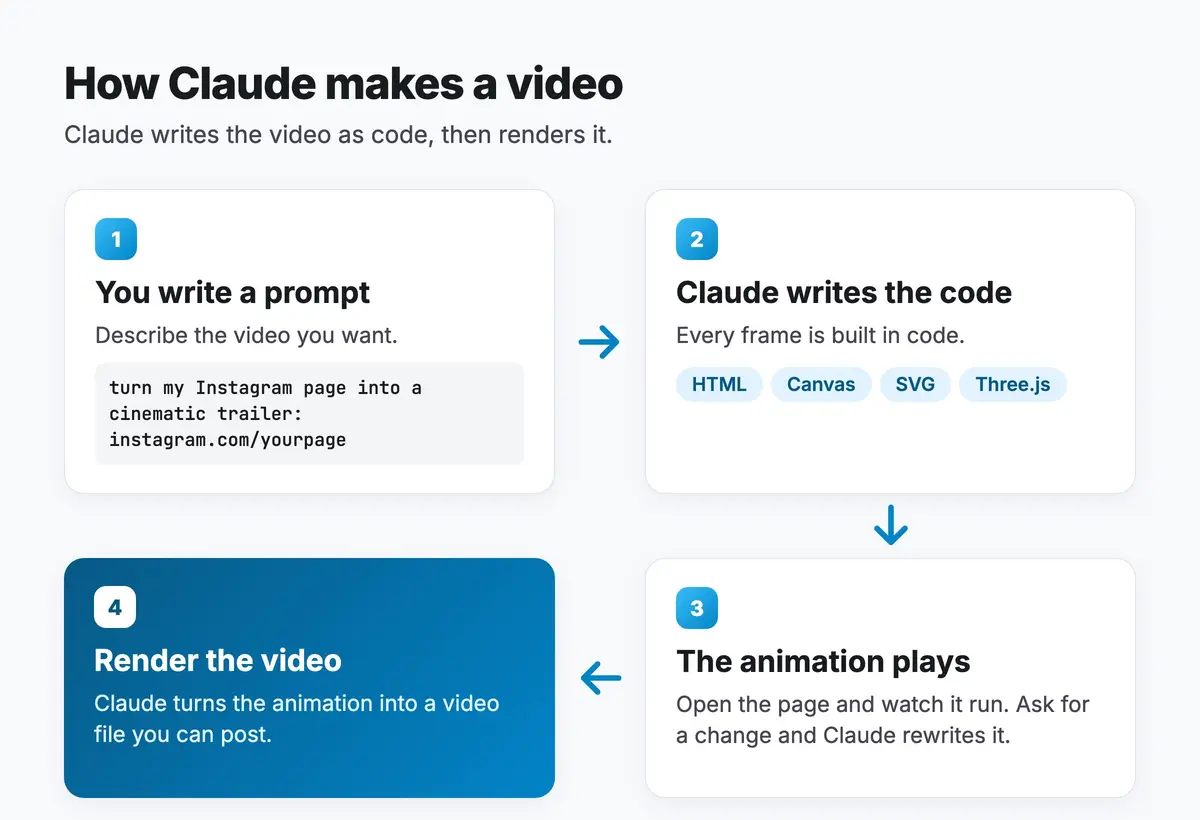
Yes. Claude video generation means asking Claude to build the video as code. It writes the animation, usually as a web page that plays when you open it, and then renders it to a video file. If you want a change, you ask for it in plain words and Claude rewrites the code.
How is this different from a text to video tool?
A text to video model paints pixels from a description. Claude writes the instructions that draw the pixels. That makes it strong at anything with structure: text that has to be spelled right, real numbers, your logo, your page layouts, and step by step explainers. It also means every frame can be changed later, because the video is a file of code.
Turn Your Instagram Into a Cinematic Trailer
I gave Claude my Instagram link and 1 prompt, and it made this trailer for withPT.ai. It handled the design, the narration, the soundtrack and the edit.

What does the Instagram trailer prompt do?
The prompt opens your public Instagram page and studies it before it designs anything. It reads your bio, your reel covers, your captions and your recent reels, looks for your strongest content, and works out what you post about and who it is for. On my page it found my most viewed recent reel and built the story around it. Then it builds a 22 to 25 second trailer around that story.
- The narration is written from your own content and read by a free voice engine on your computer, with no paid voice service.
- The music and sound effects are copyright safe. In my run, Claude generated them in code.
- The final check: after the first render, it reviews the video against a checklist, fixes what is off, and confirms the length, size and audio. On my trailer it checked its own frames before handing it over.
How do you run it?
Run it in a desktop app such as the Claude desktop app, which has smoother browser control for reading your Instagram page. Add your Instagram link and the folder for the video at the bottom of the prompt, paste it in, and let it run. It sets up the tools it needs as it goes. The full prompt is in the free download at the end of the next section.
Turn Your Website Into a Launch Video
The same idea works with a website link. I pasted withpt.ai into 1 prompt, and Claude read the site and built this launch video from my real pages, all on Sonnet 5.5.
What does the website prompt do?
The prompt opens your site at desktop and phone width, reads the About page, the pricing page and a blog page if they exist, and works out what the business is in 3 plain lines. It pulls your logo, brand colors and fonts, and records your real pages as the footage. It only uses text and numbers that appear on your site, so nothing in the video is invented.
Before it builds, it shows you a plan: the business in 3 lines, the big idea, the colors and fonts, the song, and a storyboard. It waits for your yes, then builds. The sound effects are generated in code, and it picks a royalty free track whose license allows commercial use.
The website prompt runs in Claude Code. Both prompts, the Instagram trailer and the website launch video, come as 1 free download below, each with a page on what it does and how to run it.
What Makes a Video Prompt Work
Both prompts are built on these 5 rules, with 1 difference: the website prompt stops for your yes on a plan, and the trailer prompt makes its own creative calls. The rules carry over to any video you want Claude to make, from a product demo to an explainer.
1. Give it a real source
A link beats a description. When Claude reads your actual page, the video carries your words, your colors and your proof. The website prompt goes further and forbids any number that is not on the site.
2. Make it research before it designs
Ask Claude to answer a few questions first: what you create, who it is for, what makes you different, and what a viewer should feel at the end. The trailer prompt asks exactly these, so a fitness creator and a lawyer get different videos.
3. Ask for a plan when the details matter
A storyboard is quick to read and can save a full rebuild. The website prompt asks for the big idea, the look and the shot list, then waits for your yes. For a trailer about you, letting Claude make the creative calls works well too.
4. Tell 1 story, at a set pace
Ask for 1 story with a clear shape: a problem, the answer, the proof, and a close that answers the opening. Keep each shot short, say each idea once, and make every line clear on its own.
5. Have it check its own work
End the prompt by asking Claude to review its own render before it hands the video over: cut off text, timing that lands late, a word the voice says wrong. It catches what you would otherwise catch yourself.
How to Make Your Own Video in 4 Steps
Step 1: Pick your link
Use your Instagram page for a trailer about you, or your website for a launch video about your business.
Step 2: Paste the prompt with your link
Use the trailer prompt from the handout or the website prompt above. Add your link where the prompt asks for it.
Step 3: Approve the plan, if it shows one
The website prompt shows you a plan first. Change the big idea or the look now, before anything is built. The trailer prompt goes straight to the build.
Step 4: Ask for changes in plain words
Watch the result and ask for what you want different: your logo bigger, a slower open, a different song. Claude rewrites the video and renders it again.
Where to Find More Video Ideas
If you want to see other styles before you write a prompt, the Awesome Opus 5.5 Videos collection on GitHub gathers 400+ videos people made with Claude Opus 5.5, from motion graphics to 3D scenes, and many come with the prompt the maker shared. Each one links back to the person who made it.
Which Claude Model Should You Use for Video?
My website launch video ran on Sonnet 5.5, and I find it quite powerful for this kind of work. Anthropic describes Opus 5.5 as stronger at complex, open ended work, so it is the pick for that kind of video. I compare the two families in Sonnet vs Opus, and the Claude Opus 5.5 breakdown covers what changed in the newest Opus.
The prompt matters as much as the model, and the guide to better AI prompts covers how to write one. If you want Claude to edit real footage instead, I ran that test in AI video editing with 2 models.
Frequently Asked Questions
Is Claude a video generator?
Claude makes videos by writing code that draws each frame, then renders it to a file. That works best for brand videos, motion graphics, explainers and anything built from your own content. For lifelike footage of people or places, a text to video model is the tool built for that job.
Do I need to know how to code?
No. Claude writes the code and runs it. You paste a prompt with your link, approve the plan if it shows one, and ask for changes in plain words.
What do I need to run these prompts?
A paid Claude plan. The trailer prompt runs in a desktop app such as the Claude desktop app and sets up the tools it needs as it goes. The website prompt runs in Claude Code.
What are AI video prompts?
AI video prompts are written instructions that tell an AI model what video to make. With Claude, the best ones give it a real source to read, a story to tell and a plan to approve before it builds.
Can I use my own brand colors and logo?
Yes. Both prompts pull your logo, colors and fonts from your page, and you can ask for changes after the first version.