
← Back to blog9 min read
You can hand a coding agent 1 raw recording and 1 prompt, and get back a finished video with captions and motion graphics. No editing from you. I ran the same prompt on GPT-6 Astra and Fable 5.1 to show what that looks like, and the prompt is free below so you can run it on your own video.
What This Prompt Does for Your Video
- Captions on screen, timed to your words
- Motion graphics that show what you are saying, planned and built by the model
- Your timing and audio left as recorded
- A finished file next to your original, same length and resolution
Hand a coding agent 1 recording, trimmed to the take you would post, and the prompt asks it for a finished video with captions and motion graphics, edited end to end. You need an agent that can run commands on your machine, such as Claude Code or Codex, and Node, a free program the video tool runs on. The prompt tells the agent to install anything else it needs, including Whisper if your machine has none.
No access to GPT-6 Astra or Fable 5.1? The same prompt runs on any model that can work on your machine, and you can have that model edit your video too.
The full setup kit below has the exact prompt I gave both models, how to run it, and the brand block to swap for your own colors.
Run it first on a video you have already posted, so you can compare what it chose against what you would have chosen. If you change the prompt, keep the check that the transcript covers the whole file. A transcript that stops halfway still looks valid, and nothing after the point where it stops gets a caption or a graphic.
What GPT-6 Astra and Fable 5.1 Made With It
I gave both models the same raw 1 minute 47 second recording and the same prompt, and asked each one for a finished video with captions and motion graphics. Both ran on their high effort setting, in 1 shot. No follow ups, no notes, no second pass, and no edits from me. GPT-6 Astra came back in 32 minutes. Claude Fable 5.1 took 1 hour 10 minutes. The 2 videos look nothing alike.
What I wanted to understand is how each model approaches editing: what it picks to show, how it tells the story, and where it puts me on screen. Below are both edits at the same moments, side by side, and how each model worked through the job.
Key Takeaways
- 1 prompt turned a raw recording into a finished video with captions and motion graphics, on both models, with no edits from me.
- The same prompt on the same recording produced 2 edits that look nothing alike. The prompt held the rules, and each model made its own calls on what to draw and where.
- Both models finished in 1 shot. Neither changed the timing or the audio, and neither needed a fix from me.
- GPT-6 Astra built a consistent explainer layout around the footage and finished in under half the time.
- Fable 5.1 drew real looking interfaces and literal cards over the footage, and kept me at the center of the frame.
- The prompt runs on any coding agent that can work on your machine, and a video you have already posted makes a good first test.
How the GPT-6 Astra vs Fable 5.1 Test Worked
What did each model get?
Each model got 2 things: the raw recording and the prompt. The recording is me talking to camera in 4K at 24 frames per second, already trimmed to the take I would post. Neither model got my script, a transcript or a shot list. Both ran on high, and I did not reply to either one until the finished file was sitting next to the original.
Both models run as coding agents here, which means they install tools, write code and render video on the machine rather than describing what to do. GPT-6 Astra can also work your computer directly, clicking and typing in apps the way a person does, which is a separate job from this one.
What does each line in the test hand the editor?
I wrote the script as a stress test. Each line below hands the editor a different kind of graphic to solve, mostly without saying how to draw it.
| What I said | The job it hands the editor |
|---|---|
| "1 recording, 2 models, 0 edits from me" | 3 numbers in 1 breath |
| "A timeline editor moves pixels around. This one moves code." | A comparison of 2 things |
| "Color, font, and timing, all pulled from 1 brand file" | 3 items coming from 1 source |
| "You miss 100% of the shots you don't take" | A quote with a percentage inside it |
| "Here are captions" | Captions timed to every word |
| "The raw take on one side and the finished cut on the other" | A before and after |
| "Speed first, control second, and something something third" | A ranking with a deliberate gap |
| "Anchored" | A zoom into 1 word |
| "Do nothing" | Knowing when to leave the screen alone |
| "Bring back the number from the start" | Remembering a graphic from a minute earlier |
What does the prompt tell the model to do?
The prompt reads like a brief rather than a storyboard. It sets firm rules for everything that can be checked, gives a few design principles, and leaves the choice of what to draw to the model.
| Part | What it asks for |
|---|---|
| Look | Measure the recording first: length, resolution and frame rate |
| Transcribe | Run Whisper, a speech to text model, on your own machine, time every word, and prove the transcript covers the whole file |
| Timing | Remove, reorder or speed up nothing, down to the frame |
| Decide | Work out what the viewer needs to see, and print a plan with a reason for every choice, including the lines left bare |
| Build | Make every graphic as code in a tool that turns code into video, with captions and the speaker always on screen |
| Audio | Pass the original audio through untouched |
| Prove | Look at real frames, check that no 2 graphics overlap, and confirm the length and audio match the source |
The line doing the most work sits in the decide step: "This step is the whole job and I am deliberately not telling you how to do it." Nothing in the prompt says which graphic belongs with which line. I also left out anything about my hands. I point at different places while I talk, and I wanted to see whether either model would pick that up on its own.
How Each Model Worked Through the Edit
Both models left a full working folder behind, with a written plan, the code, and notes on what they checked. Reading the 2 folders side by side is where the process differences show up.
| Step | Fable 5.1 | GPT-6 Astra |
|---|---|---|
| Finding Whisper | Found a Whisper install already on my Mac, inside another project's folder | Found a different Whisper build already on the Mac, using its built in acceleration |
| Checking word timing | Measured key words against the waveform, and moved the "1" that Whisper had placed about a second early | Checked the start, the anchor word and the end with a second, smaller Whisper model, which agreed within 0.06 seconds, and checked word starts against the waveform |
| Building | 12 graphics from 11 component files, with the callback reusing the opening one | 13 graphics, all in 1 file |
| Checking its own work | Wrote a check script that has to pass before the file counts as done, covering length, overlaps, audio and whether each graphic actually shows up on screen | Wrote check scripts for length, overlaps and audio, reviewed 41 rendered stills, fixed 2 layout problems it found, and corrected the color format of the final file |
| Time to a finished file | 1 hour 10 minutes | 32 minutes |
Both installed the video tool fresh and locked an exact version. Both also wrote checks that fail unless the frame count and audio match the source, which is the prompt's demand for proof rather than a claim of success. Astra kept its visual evidence on disk as well: 41 review stills, contact sheets and a written results table.
Did either model touch the timing or the audio?
No. I checked both finished files against the source. Each runs exactly 2582 frames at the same 4K resolution as the original recording, and the audio in each is identical to the audio I handed over.
Scene by Scene: Where the 2 Edits Split
Every image below is the same moment from both videos, with Fable 5.1 on the left and GPT-6 Astra on the right.
Where does each model put the speaker?
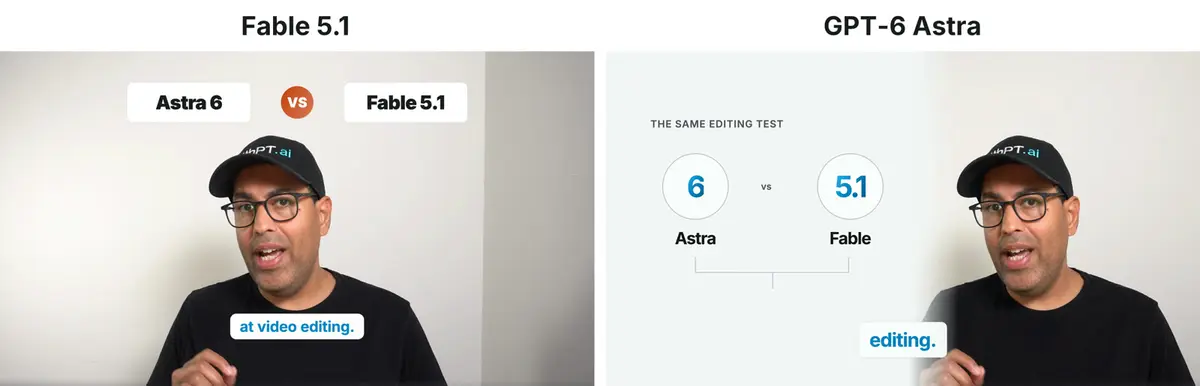
Fable 5.1 kept me in the middle of the frame and floated its graphics around me, starting with 2 name plates and an orange VS badge across the top. GPT-6 Astra slid a light panel over the left of the frame, moved me to the right, and gave the scene a small uppercase heading: "The same editing test". Astra did that for nearly every graphic in the video, so its edit reads like an explainer with 1 consistent layout. Fable never titled a scene.
Which line did only 1 model draw?
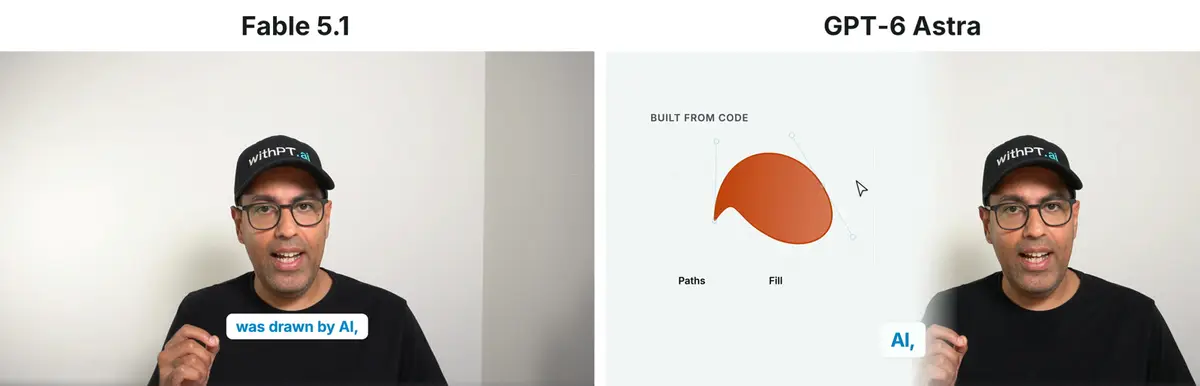
About 11 seconds in, I say "Every graphic in this video was drawn by AI." Fable left the line bare, and its plan explains why: the line describes the format, and any graphic there would have been "a rectangle with a sentence in it", the exact failure the prompt warns about. Astra drew a curve being built from handles and filled in, headed "Built from code", and its plan says it wanted to show drawing instead of repeating the claim. Both were following the same rule, show the thing rather than label it, and they reached opposite answers.
How did each model show pixels against code?
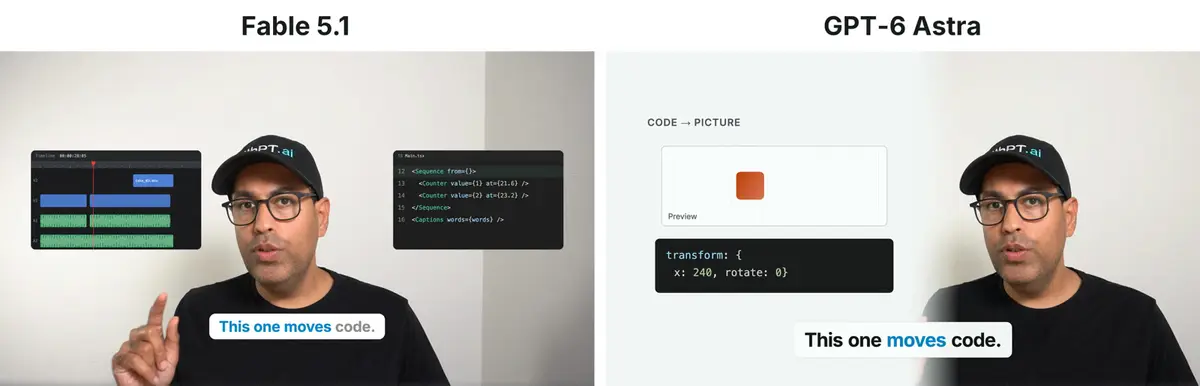
For "A timeline editor moves pixels around. This one moves code", Fable drew 2 real looking interfaces: a dark timeline with a clip being dragged, then a code editor where a number is deleted and a new one typed in. That follows the prompt's rule that anything quoting a real interface should look like the real thing. Astra showed the same 2 steps as a diagram: a cursor drags a clip along a simple timeline, then a small code block changes a value and the shape in the preview moves, headed "Code → Picture". Its plan describes it as a designed schematic rather than a copy of a real app.
How did each model handle the quote?
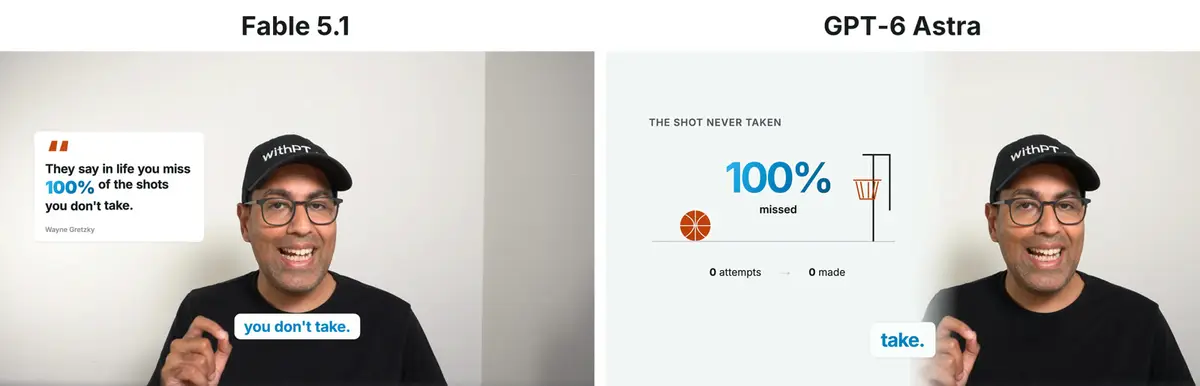
When I said "you miss 100% of the shots you don't take", Fable built a quote card. The words appear as I say them, "100%" is larger and in blue, and the card credits the line to Wayne Gretzky. Astra drew a basketball sitting on the floor, short of a hoop, with "100% missed" and "0 attempts, 0 made", and left the credit off on purpose. One model treated the line as a quote to display, the other as an idea to picture.
How do the captions differ?
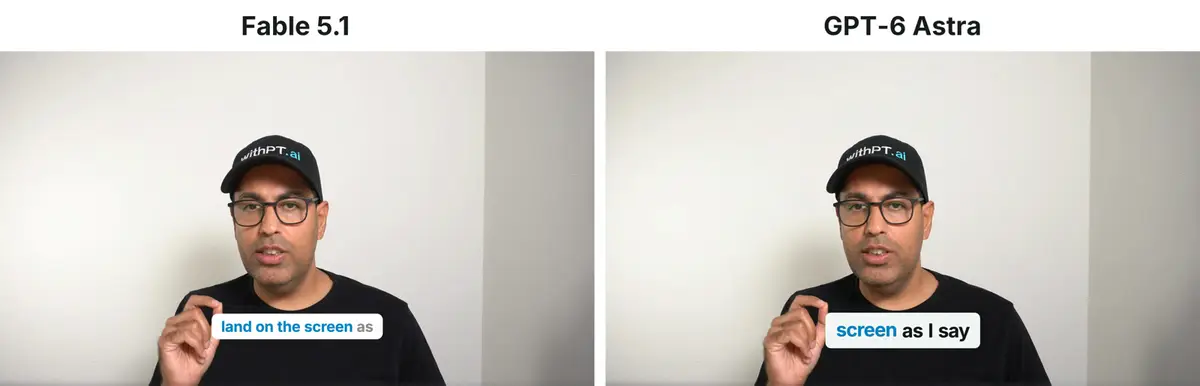
This stretch is me talking about captions, so both models let the captions be the graphic and kept them centered in the frame. Fable turns each word blue as I say it, so the color builds across the line, with up to 5 words on screen. Astra colors only the word I am on, with up to 4 words on screen.
How did each model build the before and after?
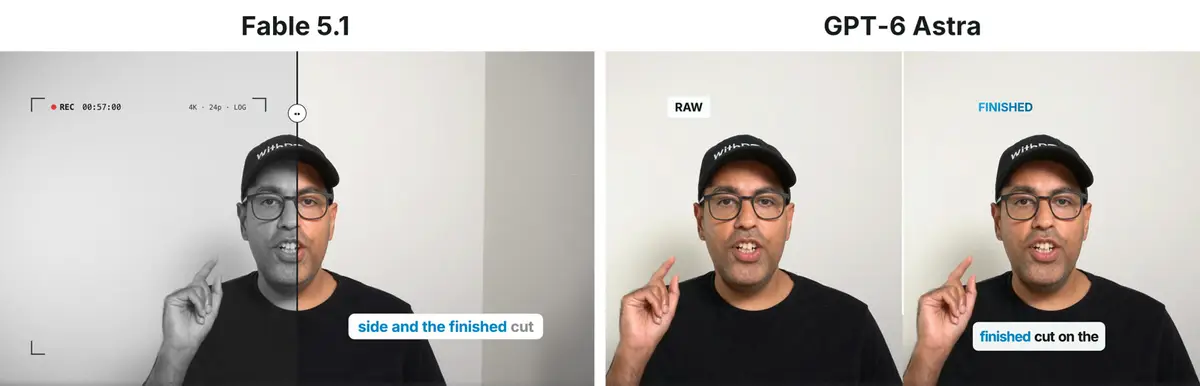
Fable split 1 live frame with a divider. The left half drains to black and white with camera brackets, a record dot and a running timecode, and the right half stays finished. Astra put 2 copies of the same frame side by side, labeled Raw and Finished, with captions only on the finished side.
What does a model do with a vague ranking item?
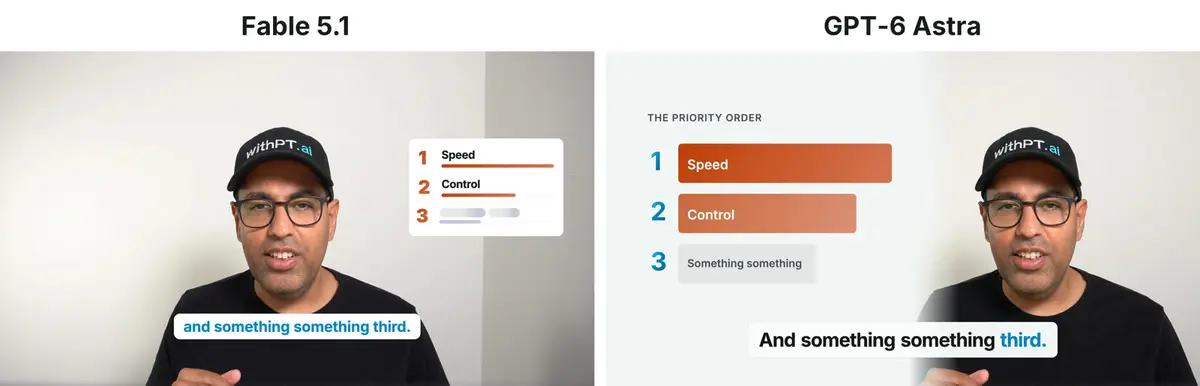
I said "speed first, control second, and something something third", vague on purpose, to see what a model does with a gap. Fable left the third row's label as a shimmering gray placeholder, and its plan calls it "the joke made visible". Astra wrote "Something something" into the third row in gray, keeping my wording exactly.
How did each model handle "anchored"?
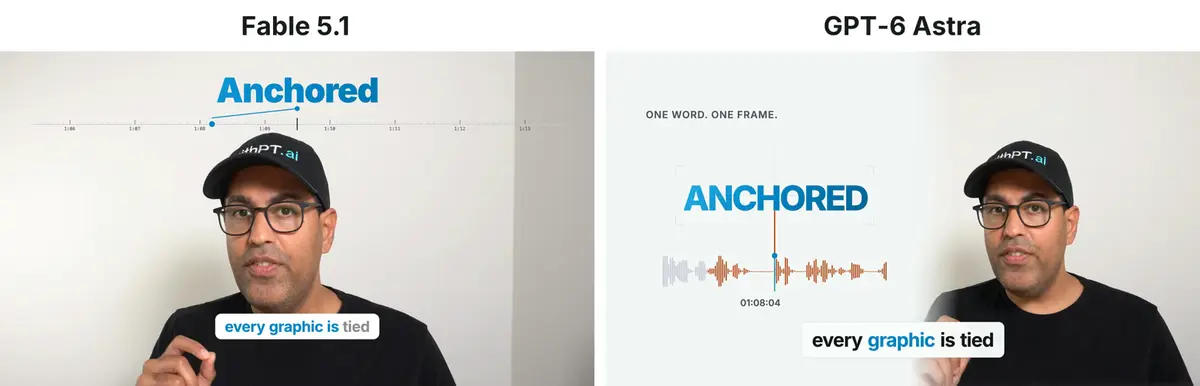
Fable zoomed into the footage itself on "zooming into", then dropped "Anchored" onto a ruler of timestamps that keeps scrolling, so the pinned moment slides into the past as the video moves on. Astra framed "ANCHORED" in focus brackets over a waveform, with a playhead fixed at the moment I said it.
Did either model leave "do nothing" alone?
Both did. When I say "Do nothing. Some sentences don't need a graphic", both edits show only me and the captions. Fable also timed its zoom to fully release before that line began, so nothing was still moving when the screen was meant to be still.
Did either model remember the number from the start?
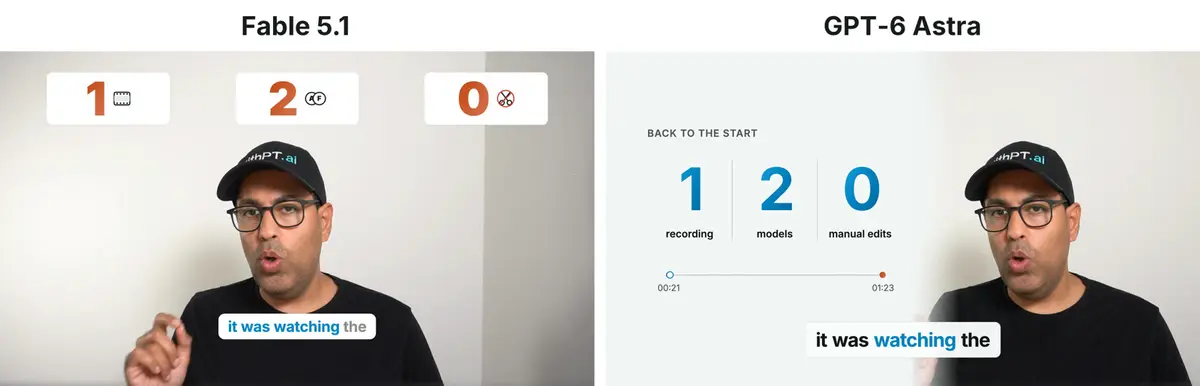
Both did. When I say "bring back the number from the start", both models brought back their 1, 2, 0 graphic from 21 seconds in. Astra added a small timeline linking 00:21 to 01:23, which makes the callback explicit. Fable put small pictures next to its numbers instead of words, a film frame, 2 avatars and crossed out scissors. Its notes say an earlier version had word labels and it took them out on review, because the captions were already saying those words.
Did either model notice me pointing?
No. I point at different places on camera throughout, and nothing in the prompt mentions it. Both models worked from the words alone. In this test, a gesture on its own did not get a graphic, so anything you want drawn is worth saying out loud.
What the 2 Edits Tell You
Both models kept the prompt's hard rules on timing, audio and captions. Layout and what gets drawn is where they split, and in this run they split along a consistent line.
GPT-6 Astra built a system. A panel, a heading on nearly every graphic and labels on the numbers give its edit the feel of a well organized explainer, and it came back in 32 minutes. Fable 5.1 built props on top of the footage: real looking interfaces, a literal quote card, and pictures in place of labels, with me held at the center of the frame. It took 1 hour 10 minutes.
If you want the same colors and type every time, set them in the prompt's brand block; both models held them in this run. Layout and what gets drawn still come from the model, so run the prompt more than once, or on 2 models, before you settle on a look. The graphics are code either way, so changing a word or a color afterward is a small code edit and a fresh render. If you plan to keep working with either model after this, there are separate guides on prompting Astra and prompting Fable.
Frequently Asked Questions
Which model finished the video edit faster?
GPT-6 Astra returned the finished video in 32 minutes. Fable 5.1 took 1 hour 10 minutes on the same recording with the same prompt, both on high.
Do you need to know video software to use this prompt?
No. The prompt tells the agent to install the video tool and write every graphic itself. You need Node installed and a coding agent that can run commands and write files on your machine.
Does the audio get sent to a transcription service?
The prompt tells the agent to transcribe with Whisper on your own machine and not to send the audio to a hosted service. Both models followed that, each using a Whisper install it found already on the Mac.
Can you use your own brand colors?
Yes. The prompt carries a brand block with colors, a typeface and shadow settings. Replace it with yours, or delete it and let the model choose a look.
What does the agent hand back when it is done?
A finished video file next to the original, with the same length, resolution and frame rate, plus a working folder holding the plan, the code and the checks it ran.