
← Back to blog8 min read
GPT-6 Astra computer use means the model works your machine directly. It reads the screen, clicks through a browser, moves between desktop apps, and carries a job to the end rather than writing you the steps to follow. The question worth answering is which of your jobs to hand it.
The short version: give it the screen work that no other tool can reach, start where a wrong click costs nothing, and leave your code with the assistant already doing it. Below are the jobs worth handing over, a first task you can paste in as it stands, and where this still falls over.
Every figure and availability note below is current at the time of writing. The launch figures come from the benchmark set published with the release, and independent index figures are named as such where they appear.
Key Takeaways
- Give it the screen work nothing else can reach. Old systems, supplier sites and admin pages that never offered a way to plug in are exactly what this is for.
- Leave your code alone. This does not replace the coding assistant you already use.
- Start with a job it cannot break. Roughly 1 in 4 tasks still fail in testing, so the first thing you hand over should be one where a mistake costs nothing.
- Expect a wrong answer more often than a breakdown. Ask it to list everything it did, then check the list yourself.
- You do not need a new plan or extra credits. It runs on the allowance you already pay for.
What is GPT-6 Astra computer use?
Computer use is the model taking actions in a graphical interface: reading what is on screen, deciding where to click, typing, moving between windows, and continuing until the task is done. GPT-6 Astra, released on 2026-09-03, does this across browsers, spreadsheets and desktop applications. OpenAI's own line for it is "Anything you can do on a computer, Astra can do for you. Fast."
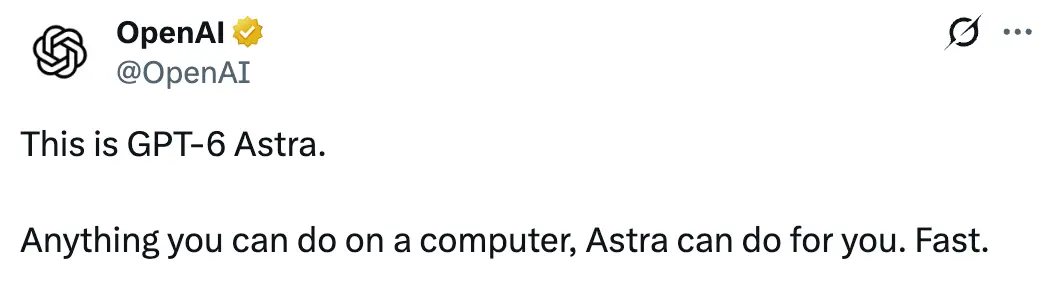
That is the claim to hold the rest of this against. It is a big one, and the useful work is deciding which parts of it you are willing to act on today.
The word doing the work there is screen. Everything else you point a model at needs a proper way in, built for software to use. This one gets in the way you do, by looking at the screen and clicking, which is why it can reach things nothing else could.
What to hand GPT-6 Astra
5 jobs worth handing over
The pattern is a job that repeats, happens on a screen, and sits behind a site or program that never gave you a shortcut.
| Job | Why it fits |
|---|---|
| Pricing the same item across 6 shops and coming back with one list | Every site is laid out differently, so nothing else reads them all |
| Booking a cinema seat, a table, or an appointment on a site with no app | Slow and fiddly, and the steps are identical every time |
| Filling the same details into 3 portals that never talk to each other | It repeats, it spans different sites, and the shape never changes |
| Pulling last month's numbers off a dashboard with no download button | The figures exist only as something on a screen behind a login |
| Renaming or refiling a pile of records in an old program nobody supports | Nothing was ever built to automate it, and nothing is coming |
The first 2 are the place to start, because looking something up cannot break anything. Anything that spends money or submits a form is where you go once you have watched it work a few times.
What all 5 share: a person doing it by hand today, no faster way in, and a mistake that costs a correction rather than a disaster.
The question that decides it
Before handing anything over, ask one thing. Does this system already offer a proper way to plug into it?
Most large services do. It is called an API, and it is a direct line in that other software can use without touching the screen at all. If one exists and you can get access, use that instead. It is faster, it costs less, it repeats reliably, and it cannot misread a button.
If there is no direct line in, or getting access means waiting 3 weeks on a supplier who may never answer, that is the gap this fills. It is the difference between a job nobody ever gets round to automating and one you can hand over this afternoon.
A first task worth running
Start read only, so the worst case is a wrong answer rather than a wrong action. Paste this in and change the bracketed parts:
I want you to collect information from a web app I use.
Work in the browser, and do not change anything.

The task: log in to [tool name] at [url], open [section],
and for each of the last [N] records, collect:
- [field 1]
- [field 2]
- [field 3]

Rules:
- Read only. Do not edit, delete, submit, or click
  anything that changes state.
- If a page does not look like what I described, stop
  and tell me what you see instead of guessing.
- If you cannot find a field, write "not found" rather
  than working it out from something nearby.

When you are done, give me two things: the data as a
table, and a numbered list of every page you visited
and every action you took.
That last instruction matters more than the rest of it. The list of actions is what makes the result checkable, and checking is the part you cannot skip yet.
How to bound the first run
- Watch it. Not the tenth run, the first few. You are learning where it gets confused, and that is worth the time it costs.
- Use a login that cannot do damage. One that can look but not change, or a spare test account. Never your banking or billing pages, never the place your customer records live.
- Give it a stopping rule. "Stop and ask me if the page does not match" beats it guessing its way through a screen it did not expect.
- Ask for the receipts. Every run should end with a list of what it did, in order, so you check the trail rather than trusting the summary.
What to keep on your coding agent
If you write software, this does not touch the part of your day that matters most. My own day runs on Claude Code and Codex working directly on my code, and nothing in this release changes that setup.
The line that holds is how easily you can undo it. A coding assistant changes files that are tracked, so you can read exactly what it did and put it back the way it was. A computer use agent works in live systems, where clicking the button is the real thing happening to a real account, and there is nothing to review before it lands.
So the split is straightforward. Anything that lives in your code stays where it is. Anything that lives only on a screen is what you can now hand over. Most of the value here is not in the code at all. It is the browser tabs, the dashboards, the forms and the checking that sit around the work, which nobody had a good answer for until the numbers on it moved.
Where computer use still falls over
More than 1 in 4 tasks do not land
On the OSWorld 2.0 offline subset, Astra scores 72.6% against 65.7% for the model it replaces, and on AutomationBench 41.4% against 18.1%. Those are real gains. They are also a pass rate rather than autonomy, and a curated benchmark is not a base rate for your own work, which is messier than anything in a test set.
The failure to plan for is a confident wrong answer
A crash is the easy case. It stops, you see it, you fix it. The expensive failure in a graphical interface is the run that finishes, reports success, and did something slightly wrong on the way: the neighbouring row, last month instead of this one, the second of 2 similarly named buttons. Nothing errors, and the output looks exactly like a correct one.
That is the whole reason the prompt above asks for a numbered list of actions. Judge the run on that trail rather than on its summary, at least until you have watched enough runs to know where it drifts.
Give it less access than it can use
Astra is the first model OpenAI has designated as reaching the "critical" cybersecurity threshold under its own preparedness framework, meaning it can potentially find and exploit unknown vulnerabilities in well protected systems without step by step human guidance. It scored 100% on ExploitBench, though OpenAI notes that its reported cyber results reflect an enhanced access internal configuration rather than the model that reaches a normal account.
That designation is why the rollout is staged, and it is the most useful context available for deciding how much access to hand a model that can also drive your machine.
How good is GPT-6 Astra, really
Worth knowing, though it is background rather than the decision. On DeepSWE v1.1, a test of 113 coding jobs carried out start to finish, Astra scores 74.1%.
| Model | DeepSWE v1.1 |
|---|---|
| GPT-6 Astra | 74.1% |
| Gemini 3.8 Flash | 73.8% |
| Claude Opus 5 | 73.7% |
| Claude Fable 5.1 | 67.4% |
Astra leads, by 0.3 of a point over Gemini 3.8 Flash and 0.4 over Claude Opus 5. That is close enough that the test has stopped telling you which one to use. Artificial Analysis runs its own tests, separately and its own way. On its coding score Astra reaches 67, level with Claude Fable 5 rather than ahead of it. On its broader score, which is not about coding at all, Astra sits at 61.2 against Claude Opus 5's 63.1.
Read together, nobody has pulled away on coding. If you already have a coding agent that works for you, a fraction of a point on one table is not a reason to move. The Gemini 3.6 Flash launch told the same story from the other side, where the wins were real, narrow and specific to the job.
Computer use is the part of this release that is new capability rather than a slightly higher score, which is why the rest of this post is about that.
Who can use GPT-6 Astra today
Which plans get it
Access is staged rather than switched on for everyone at once. A limited group of early access organizations received it first, with Plus, Pro, Business and Enterprise following together, alongside the API and AWS. At the time of writing, opening ChatGPT on a Plus plan does not reliably show Astra yet. That is the rollout working as designed, not a fault with your account.
Does it have its own usage limit?
No. Astra sits inside the plan allowance you already have. OpenAI's wording: "Across the plans Astra will be included in the normal usage allocation and you will be able to use 100% of it towards Astra." There is no second bucket to earn and no separate Astra quota to run down, which is the same mechanic behind Codex usage limits. Long autonomous runs do spend more of that allowance than short questions, so a supervised computer use task is not free in practice.
Image generation, file uploads and voice remain capped separately from text.
What it costs on the API
Only relevant if you call the model directly. On a subscription, the section above is your answer and this table is not.
| Rate (per 1M tokens) | Standard | Fast mode |
|---|---|---|
| Input | $10 | $20 |
| Output | $50 | $100 |
Fast mode doubles the rate for speed, not for a better answer. That is the same trade GPT-5.6 pricing put on Sol's Fast mode, described there in OpenAI's own words as carrying "no change in intelligence." Cached input is $1. Context runs to 1,050,000 tokens with a maximum output of 128,000, and prompts above 272,000 input tokens are billed at 2x input and 1.5x output, per the model docs. That 272,000 figure is a billing threshold and not the size of the window. The same distinction sits underneath the Codex context window.
Frequently Asked Questions
What can GPT-6 Astra actually do on my computer?
It works a graphical interface the way you would: opening a browser, logging in, clicking through pages, typing into forms, moving between desktop applications, and carrying on until the task is done. The jobs it suits are the repetitive visual ones behind tools with no API, such as collecting figures from dashboards or repeating the same entry across 2 systems.
Should I use computer use or write a script?
Write the script if the system has an API you can get credentials for. It will be faster, cheaper and repeatable. Computer use earns its place where no API exists, where you cannot get access to one, or where the interface changes often enough that a scraper keeps breaking.
Does GPT-6 Astra replace Claude Code or Codex?
No. Those work directly on your code, where every change is tracked and you can put it back. This works in live systems, where an action happens the moment it clicks. They cover different work, and the practical setup is to keep the coding assistant you have and hand the screen jobs to this.
Is GPT-6 Astra better than Claude Opus 5?
On coding, marginally. Astra scores 74.1% on DeepSWE v1.1 against 73.7% for Opus 5, a gap too small to choose on, and Artificial Analysis's separate testing does not put Astra ahead. On computer use there is no head to head to give you here: the published figures compare Astra to the model it replaces, not to Opus 5. So pick on the capability you actually need rather than on a ranking.
Can it run without me watching?
It can act without step by step instruction, but more than 1 in 4 tasks on the OSWorld benchmark subset still fail, and a curated benchmark is not a base rate for your own work. Supervised runs on low stakes jobs are the sensible setting today, with a read only account wherever the task allows one.
Do I need a Pro plan?
No. Astra is coming to Plus as well as Pro, along with Business and Enterprise. The rollout is staged, so the plan you hold and the day it appears are 2 different things.