How to Write Better AI Prompts: Treat It Like a Brief
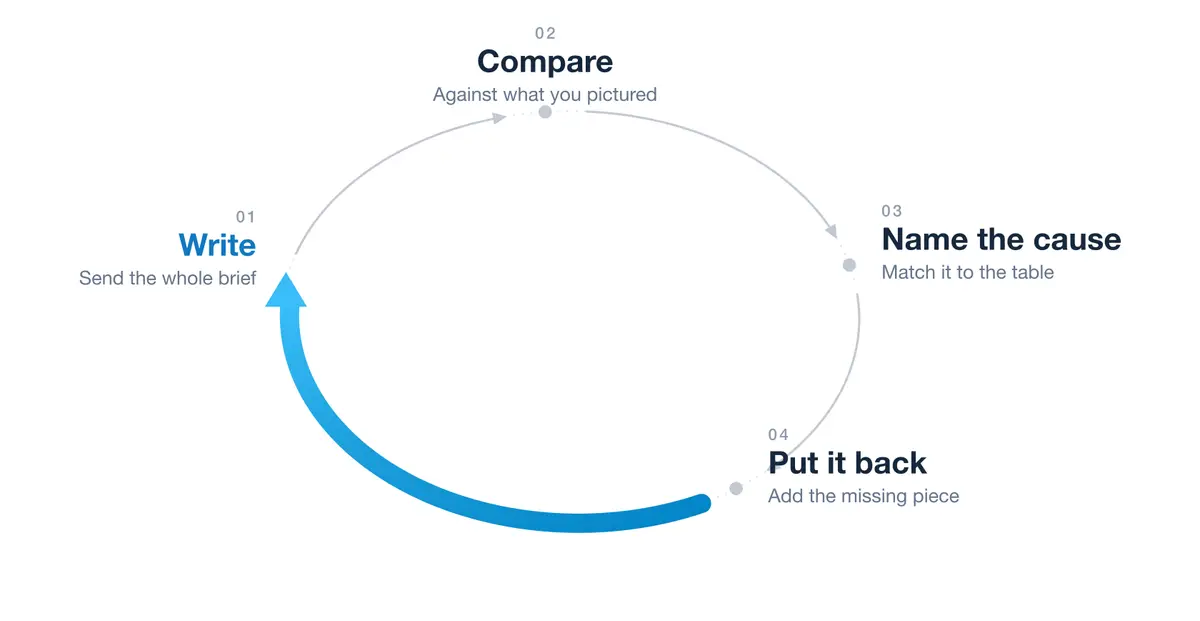
The honest answer to how to write better AI prompts is that there is no perfect wording waiting to be found. A prompt is a brief, and the way you get better at briefs is a loop: write it, compare what came back against what you wanted, name the cause of the difference, and put the missing piece in. Prompting is a skill, which means it improves with repetition. That is also why two people can open the same model on the same morning and walk away with completely different opinions of it.
Key Takeaways
A prompt is a brief, not a chat message. Everything the model cannot see from where it sits, you put there.
Prompting is a skill built through repetition. The loop is write, compare, name the cause, put the missing piece in.
Not every weak answer is a prompt problem. A long thread, a single unlucky reply, or a job the model cannot reach will all do it, and none of them is fixed by better wording.
When the request is the problem, the most common fault by far is a missing finish line: length, format, audience, and what good means.
Prompting is the floor. Once you can brief a model reliably, the next move is handing it whole jobs rather than single questions.
Short on time? Jump to the 4 shapes and the loop that follows it, which has a worked prompt you can copy.
What it means to say prompting is a skill
A prompting skill is the ability to describe a job clearly enough that a model can finish it without you filling in the gaps afterwards. That means saying what you want, saying what done looks like, giving the model the context it cannot see, and then reading the answer well enough to work out why it came back the way it did. It is the same set of moves every time, applied faster and with better instincts as you practice.
The reason this matters is that the model is not the variable most of the time. You and I can both send the same request to the same version of the same model within a minute of each other and get answers of very different quality. The gap sits in the request.
Why two people get different results from the same model
A model builds its answer out of what you gave it. It cannot see your customer, your calendar, the document you did not paste, or the standard you are quietly holding it to. Whatever is missing, it either infers or invents. Two people who hand it different amounts get different answers, and neither of them is using a different model.
There is a measurement nearby that people reach for here, and it is worth being careful with. In its June 2026 economic index report, Anthropic found that Claude's output sits at a higher comprehension level than the prompt that produced it, by roughly one year of education on average. It is tempting to read that as proof that better prompts produce better answers. Anthropic does not read it that way. The report suggests some of the gap is simply the difference in how the two are written, since prompts tend to be short and blunt while replies tend to be polished. It measures reading level, which is not the same thing as quality, and it makes no recommendation that anyone change how they prompt.
So I am not going to lean on it. The argument here stands on something plainer: the model cannot use what you did not give it.
Not every weak answer is a prompt problem
When an answer comes back weak, the instinct is to reword and resend. That is right often enough to be a habit and wrong often enough to cost you a morning. Three other things produce a bad answer, and none of them care how well you write.
The thread. In a long conversation the model is still carrying everything above it, including the earlier turns that went nowhere. Starting a fresh conversation fixes more of these than a better sentence does.
A single unlucky reply. The same prompt run twice gives different answers. Sometimes the first one is just a poor version of what the model can do, and sending the identical prompt again is enough.
The job needs something the model does not have. A fact it cannot reach, a tool it has not got, or more thinking than the setting you are on allows.
The first two are cheap to check, so check them first: send it again, or open a clean conversation, before you start rewriting.
The third is worth knowing how to unpick, because it wears the same face as a bad prompt. Confident, specific, and wrong. If the missing thing is facts, ask the model to look them up where your tool can search, and paste them in yourself where it cannot. Whether search is available varies by product and by plan, so it is worth knowing which you have rather than assuming. If the answer is thin rather than wrong, the next lever is the thinking level, which most of the main apps now expose next to the model picker under a name like thinking or reasoning. Turning it up is more controllable than switching models, though not cheaper: a longer think spends more of your allowance, the same way a bigger model does. Only after that is it a model choice, and the short version is to watch the thinking level and not only the model name.
4 shapes a weak prompt takes, and what to put back in
Once those three are ruled out, a fixable prompt tends to fail in one of four shapes. Read the first column, since that is the part you already have in front of you.
What the answer looks like
What went wrong
What to put back in
Reasonable but the wrong shape, wrong length, wrong format
No definition of done
Length, format, audience, and what good means
Generic, could apply to anyone, reads like a textbook
Too vague
Who it is for, what it is for, and the situation around it
Covers everything shallowly, drops one of your asks entirely
Too many jobs at once
One job per prompt. Send the first, then feed what came back into the second
Technically correct, tonally off, not how you would say it
No example
One sample of the output you want, even a rough one
Match what you got to the first column, and when two rows fit, take the higher one. The bottom two are easy to call, because a dropped ask and a wrong tone are hard to mistake for anything else. The top two are the pair that look alike from where you are sitting, since an answer with no finish line often reads as generic. The table is ordered so that tie breaks usefully: a missing finish line is both the most common fault and the cheapest to correct, so when you cannot separate the two, add the finish line and look again.
A prompt with no finish line cannot produce a finished answer, because nothing in the request tells the model when to stop. "Write me a product update" has no finish line. "Write a product update, about 200 words, in three short bullets, for existing customers who are still on the old version, covering what changed and what they need to do" has all four: length, format, audience, and what good means.
How to write better AI prompts in 4 steps
The usual advice is a list of ingredients: add a role, add context, add a format. All of it helps. What it leaves out is what to do with the answer you did not want, which is where the skill actually gets built.
One thing to settle before the loop, because it changes every step of it. A prompt is a brief, not a chat message. The box looks like a messaging app, and that shape pulls you toward one line and send, the way you would text somebody who already knows the situation. The model does not know the situation. Everything it needs, you put there.
Here is what that difference looks like. The thin version:
Write a product update about the new dashboard.
And the brief:
Write a product update about the new dashboard.

Audience: existing customers who are still on the old version.
Length: about 200 words.
Format: three short bullets, then one closing line.
Good means: someone reading it knows what changed and what they
need to do next, without having to open anything else.
The four labels are the reusable part. Keep Audience, Length, Format and Good means, and swap everything after the colons for your own work. Notice that none of it tells the model how to think or what steps to follow. It is all context and a finish line, which is the part that still earns its place.
Then the loop.
Write the whole brief, then send it. Put in everything the model cannot see from where it sits before you send anything. This is where most of the difference comes from, and it is the step the chat box quietly discourages.
Compare the answer to what you pictured. Not "is it good" but "how is it different from what I had in my head". Too long. Too formal. Missed the actual question. Wrote for the wrong reader. Three things to clear before you go on, because nothing below fixes any of them: if the answer is odd rather than merely off, send it once more or open a clean conversation; if it is confident and specific about something you cannot check, it is short of facts rather than instructions; and if it is simply thin, turn the thinking level up before you touch a word of the prompt.
Match what you got to the first column of the table above, taking the higher row when two of them fit. The pull here is to jump straight to a rewrite. Naming the cause first is what does the work, because you are diagnosing the request rather than patching the answer.
Put that row's missing piece back in and send it again. One row at a time, so you can tell which row was the problem.
Steps 1 and 3 are the ones that get dropped. Step 1 because the box invites a one liner, step 3 because a rewrite feels faster than a diagnosis. They are also the two that decide whether the loop teaches you anything, which is why the return to the start matters more than it looks.
Running the loop is not the same thing as sending a thin prompt and then correcting it over and over. You are changing the brief one row at a time and watching which row moved the answer. A few passes on a real piece of work will teach you your own defaults, which is the thing no article can hand you: everybody leans on the same couple of omissions, and you only find out which ones are yours by watching them come back.
When better AI prompts stop being the answer
There is a point where the loop stops paying. You get the prompt right, you get a good answer, and then tomorrow you open a blank window and type the whole thing again. The skill is working and the work is not compounding.
Two things change at that point.
The first is that leaner usually beats heavier now. Current models do more of the thinking themselves, so the extra instruction people built up around older models can now work against them. Lean means cutting the lines that tell the model how to think, the reminders and the step by step procedures, while the context and the finish line stay exactly where they are. It also comes with a catch worth knowing: Anthropic's guidance says its current models are trained for precise instruction following, so the scope of a job needs saying more explicitly, not less. Tell it to fix every heading and it fixes every heading. Tell it to fix the heading and it fixes one.
OpenAI's own guidance runs the same way, saying that removing repeated instructions and duplicate examples can improve both task performance and how much a job costs to run, which on a subscription plan shows up as your allowance lasting longer rather than as a smaller bill. It also says its current model can often work out the underlying goal from context without being told every step. Note the word repeated: one good example still earns its place, and stacking a third and fourth on top of it is what stops paying. Both pages are written for developers building against the API, and their measured numbers come from the kind of standing instruction file a model reads before anything else, rather than from anybody's chat window, so treat the direction as transferable and the figures as not. Both pages also say to keep supplying context, hard constraints and success criteria, which is the same split in the vendors' own words. That is what sent me back through my own setup deleting three instructions that older models genuinely needed.
The second is that the prompt stops being the unit of work. Instead of writing a good brief each time, you write the standing instructions once, in a file the model reads before anything else, and then ask small questions on top of it. Then you hand over whole jobs rather than single questions. That shift, from writing a prompt to handing over a job, is what the AI workshop is built around, and it is the reason I treat prompting as the floor rather than the ceiling. You cannot hand a job to something you cannot brief.
None of that makes the skill obsolete. It moves it. The four steps stay exactly the same, and you run them on instructions and jobs instead of on single messages.
Frequently Asked Questions
Is prompt engineering worth learning?
Prompt engineering, which is just the formal name for writing prompts well, is worth learning as a working skill. The formal job title is a separate question. The four step loop above takes an afternoon to understand and pays back every day you use a model for real work. What has genuinely changed is that the value has moved from clever phrasing toward describing a job well, which is more durable than any specific technique.
How long does it take to get good at writing AI prompts?
The gain arrives early and then flattens, because the failures repeat rather than multiply. Everybody has two or three omissions they make by default, and once those are in your hands the rest is upkeep: re checking your habits when a model changes, and noticing when a job has outgrown a prompt.
Do prompting skills transfer between different AI tools?
The core transfers, because describing a job clearly is the same everywhere. What does not transfer is everything around it: whether that product can search the web and whether it is switched on, which tools it can reach, what it remembers between conversations, where its standing instructions live, and how much instruction that particular model wants. That last one moves with every release, so a habit that served you on an older model is worth re checking rather than carrying over.
Is prompt engineering going away as models get better?
Prompting is getting simpler rather than disappearing. Newer models work more out from context, so a prompt heavy with instructions about how to proceed can perform worse than a lean one carrying the same context. This is about instructions, not length: the context, the scope, one good example and the finish line all stay. The part that survives is knowing what you actually want and being able to say it, which no model improvement removes.