Claude Opus 5 Prompting: Delete These 3 Instructions
Claude Opus 5 prompting mostly means taking things out. The instructions that made older models reliable, the double check lines, the step by step scaffolding, the long list of rules at the top of your system prompt, now cost you tokens without improving the answer. Anthropic says it removed over 80% of Claude Code's own system prompt for models like Opus 5 and Fable 5, with no measurable loss on its coding evaluations. This post covers the three things to delete, the one setting to change, and what I have seen running Opus 5 as my daily model.
Key Takeaways
Delete verification instructions. Opus 5 already verifies its own work, so telling it to check again adds a redundant pass.
Set reasoning effort to low or medium as your default. I run there 70 to 80% of the time and still get the results I want. Ramp up when a task needs it.
Cut rigid rules and tool examples from your system prompt. They fence the model into a smaller space than it needs.
Effort controls how long the model thinks, not how long it writes. If you want a shorter answer, ask for one.
Since moving to low and medium, my usage limits move at least 30% slower.
The AI space moves weekly, so treat the setting names and behavior below as current at the time of writing.
What Changed in Claude Opus 5 Prompting
Claude Opus 5 prompting is a subtraction problem rather than an addition problem. Older models needed guardrails because their judgment was thinner, so the working habit was to write more: more rules, more examples, more reminders to be careful. Opus 5 already does most of that on its own, so the same prompt now produces duplicated effort instead of better output.
Anthropic's rules for context engineering put a number on how far this goes. Anthropic removed over 80% of Claude Code's system prompt for its more advanced models with no loss in performance. A rule like "never write multi paragraph docstrings" was a guardrail for a model that could not read the room. The replacement is one line that trusts judgment: write code that reads like the surrounding code, matching its comment density, naming, and idiom.
The practical version for anyone sitting in Claude Code right now is three deletions and one setting.
Delete Your Verification Instructions
The single highest value edit is removing every line that tells the model to check itself. Anthropic's guidance is direct about it: Claude Opus 5 verifies its own work without being told to, and explicit verification instructions cause over verification, which wastes tokens with no gain in quality. The same goes for "double check your answer" and "re verify before responding". Those compound with behavior the model already has.
This is the part I noticed before I read the documentation. Opus 5 has an awareness older models did not. I have watched it make a set of changes, keep working, discover partway through that the premise it started from was wrong, and go back and fix what it had already written. Nothing in my prompt asked for that. It was not a retry after a failure either, it caught itself mid task.
So the instruction was never doing the work. My own verification lines were sitting on top of a model that was already self correcting, and all they bought was a second pass over ground it had covered.
Go open your CLAUDE.md and your slash commands and search for "verify", "double check", and "make sure". Most of what you find was written for a model you are no longer running.
Set Reasoning Effort to Low or Medium
Reasoning effort is the dial that controls how much the model thinks before it answers, and on Opus 5 it runs low, medium, high, xhigh, and max. High is the default. Anthropic's own advice is to use low and medium liberally as the primary control for token cost and response time wherever quality holds, and step up to xhigh for demanding coding and agentic work.
Effort
Reach for it when
Cost
low
Everyday edits, reading code, quick answers
Lowest
medium
Real work with some judgment in it
Low
high
The default. Complex reasoning
Higher
xhigh
Hard coding and long agent runs
Higher still
max
The deepest reasoning the model has
Highest
In Claude Code you set it with the /effort command. Run /effort on its own for a slider, /effort low to set it directly, or /effort auto to hand it back to the model's default. The same slider sits inside /model on the left and right arrow keys.
Here is what that looks like in practice for me. I run Claude Code on Opus 5 as my daily driver across my own projects and client work, and I am on low or medium roughly 70 to 80% of the time. The output has been good enough that I have not gone back up. What I see instead is my usage limits moving slowly. I would put it at a 30% cut at least, and that is the conservative read.
The thing I did not expect is that dropping effort did not feel like dropping quality. I expected to trade something. On most of what I do in a day, there was nothing to trade.
If usage is the constraint you keep running into, the effort dial is the first lever, and an advisor setup is the second one. It gets you most of a top model's quality while running the session on something cheaper, which stacks with everything above.
Cut the Rules and the Examples
The third deletion is your system prompt and your project instructions. Two things in particular are worth pulling out.
Rigid rules come first. A rule written as a hard constraint was usually there to stop an older model doing something clumsy, and it now blocks the model from a better call it would have made on its own. Tool usage examples come second. An example teaches by demonstration, and demonstration fences the model into the exploration space your example happened to show.
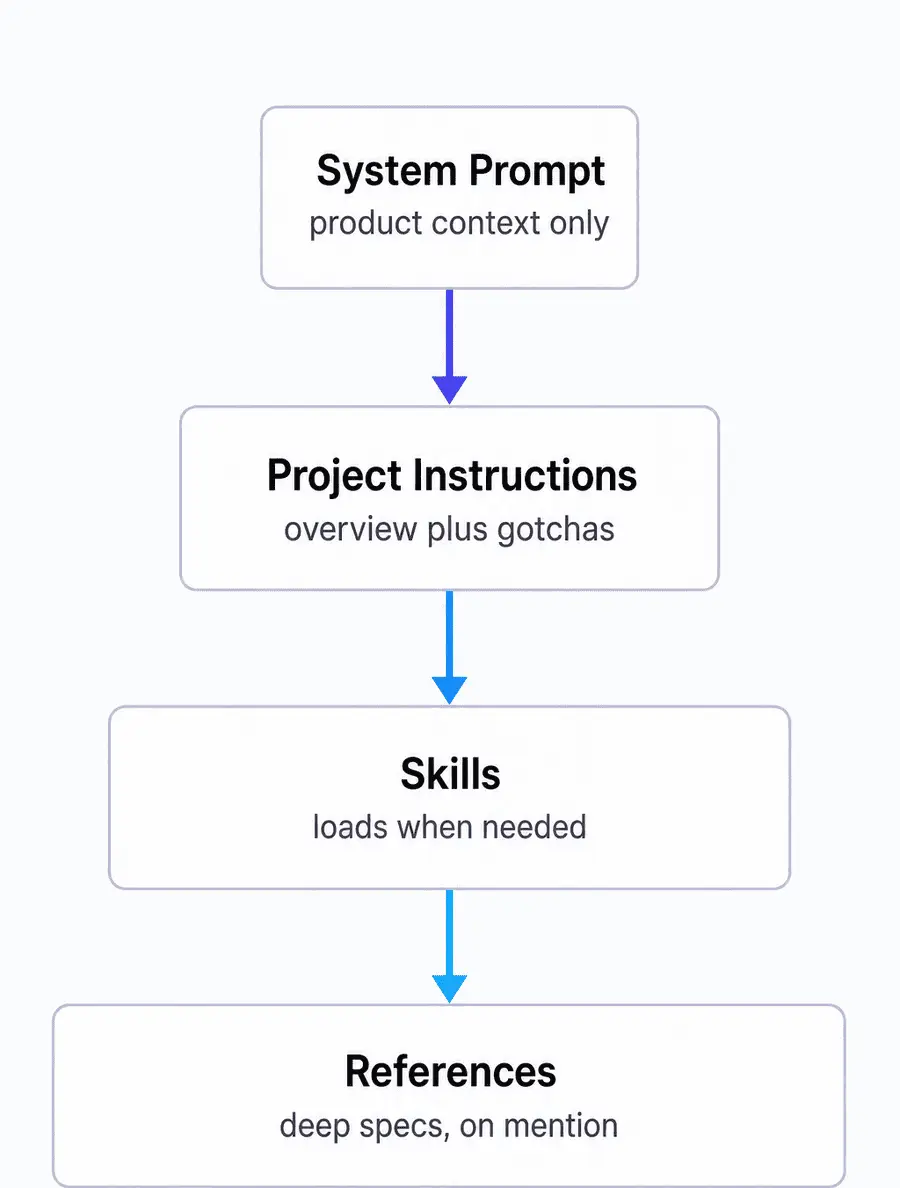
The shape Anthropic uses in Claude Code itself, and suggests adapting, is layered rather than flat:
System prompt. Product context only. What this thing is and who it serves.
Project instructions. A light overview plus the gotchas someone new would trip on. Skip anything the model can read from the repo.
Skills. Detail that loads only when it is needed, instead of riding along in every request.
References. Deep specs, code samples, and test suites, pulled in by mention.
The word for that middle idea is progressive disclosure: context arrives when the task calls for it, rather than all at once at the top. Loading everything upfront is what makes a long system prompt worse than a short one, not just more expensive. Repeating the same instruction in both the system prompt and a tool description is the same problem in miniature, and Anthropic found it in its own. Codex takes the opposite lever for the same budget: instead of trimming what loads, the Codex context window can be raised past its default, at a real cost to your allowance.
Claude Code has a /doctor command that runs a health check on your setup, and part of what it reports is unused skills, MCP servers, and plugins weighed against what they cost you in context. It is a faster start than reading your own files with fresh eyes.
Ask for Length, Do Not Infer It
One trap is worth naming because it looks like a bug. Lowering effort reduces how much the model thinks. It does not reliably shorten what the model writes. Opus 5 also narrates its work more readily than earlier versions, so a run at low effort can still produce a long response.
The fix is to say so. Put the length instruction in the prompt directly, and if the narration is the part you want tuned, ask for the outcome first: the opening sentence should answer what happened, with the detail after it. If you find yourself typing the same length instruction every session, Claude Code output styles set it once instead.
Cap Your Subagents
Opus 5 delegates to subagents more eagerly than earlier models. That pays off on genuinely independent tracks of work with real size to them, and it multiplies cost and time when it gets pointed at something small.
Give it a cap rather than a suggestion. Name the number of agents you want for a task, or say plainly that work below a certain size stays in the main session. Claude Code has a separate control worth knowing about too. Dynamic workflow size is a settings row that caps how wide a single workflow fans out, which is a different mechanism from the delegation above and worth setting once.
Frequently Asked Questions
What is the best reasoning effort for Claude Opus 5?
Low or medium for most work. Anthropic recommends using low and medium liberally as the main control for token cost and response time wherever quality holds, and stepping up to xhigh for demanding coding and agentic work. High is the default, and Anthropic's advice is to start there and step down wherever quality holds. In Claude Code the command is /effort. Running low or medium roughly three quarters of the time has cut how fast I move through my usage limits by at least 30%.
Should I tell Claude Opus 5 to double check its work?
No. Claude Opus 5 verifies its own work without being asked, and Anthropic's prompting guidance says explicit verification instructions cause over verification, spending tokens with no gain in quality. Instructions like "double check your answer" and "re verify before responding" compound with behavior the model already has. Removing them is one of the cheapest edits available.
Do old prompts still work on Claude Opus 5?
They work, they just cost more than they should. A prompt written for an older model usually carries verification lines, rigid rules, and tool examples that Opus 5 does not need, so it spends tokens duplicating effort. The prompts to revisit first are the ones you reuse most: your project instructions file, your slash commands, and any agent definitions.
How do I make Claude Opus 5 give shorter answers?
Ask for it in the prompt. Reasoning effort controls how much the model thinks, not how much it writes, so lowering effort does not reliably shorten the visible response. Opus 5 also narrates more than earlier versions. State the length you want, and ask it to lead with the outcome so the first sentence answers what happened.
What is progressive disclosure in context engineering?
Progressive disclosure is loading context only when a task needs it, instead of putting everything in the system prompt upfront. In practice it means a light project instructions file, with detail moved into skills and reference files that get pulled in on demand. Anthropic's context engineering guidance names information overload from upfront loading as one of the main things to stop doing with newer models.
The Two Minute Version
Claude Opus 5 prompting comes down to trusting the model more than your old prompt does. Open your project instructions, delete the verification lines, pull out the rigid rules and the tool examples, and move the deep detail into files that load when they are needed. Then set reasoning effort to low or medium and leave it there until a task genuinely earns more.
That is roughly three quarters of my working days now, and the clearest signal it is working is how slowly my usage limits move. If you would rather work through your own setup with me than read about mine, that is what the AI workshop is for.