Claude Code Output Styles: Change How It Talks To You
Claude Code output styles are a setting that changes how Claude writes its answers back to you: the role it takes, the tone, and the format. Anthropic's own wording is that output styles change how Claude responds, not what Claude knows, so the model is the same model either way. Claude Code has four styles built in, and you can write your own in about a minute.
Key Takeaways
- An output style sets the role, tone, and format of Claude Code's replies. It does not change what Claude knows.
- Four styles are built in: Default, Proactive, Explanatory, and Learning.
- You pick one in
/config, under Output style. The older /output-style command was removed.
- You can write your own, in plain language, and tell Claude Code to save it for you.
- The style you pick applies to the project you are in, and it starts on your next session.
Short on time? Jump to writing your own output style, which is the part worth doing today.
What an Output Style Actually Changes
An output style is a set of instructions about role, tone, and format. It goes into the system prompt, which is the standing brief Claude Code reads before it sees anything you type, and it tells Claude how you want to be spoken to: how long an answer should run, what to lead with, whether to show its reasoning, what to put at the end.
What it does not touch is knowledge. The model is the same model, knowing the same things, before and after the switch. Anthropic states it plainly in the output styles documentation: "Output styles change how Claude responds, not what Claude knows." So asking for shorter answers does not get you a worse model.
This goes wider than tone. Anthropic's own framing for output styles is adapting Claude Code to work beyond software engineering, a writing assistant or a data analyst rather than a coding agent. That is the same setting, used harder.
An output style is a different thing from a CLAUDE.md, and the two are easy to mix up. They land in different places: an output style goes into the system prompt itself, while a CLAUDE.md arrives as a message after it. So the split is what each one is for. A CLAUDE.md carries rules and facts about a project. An output style carries how you want to be spoken to.
The Four Styles Claude Code Ships With
| Style |
What it does |
When it earns its place |
| Default |
Works through software engineering tasks efficiently |
Everyday work, when you already know the codebase |
| Proactive |
Acts immediately and makes reasonable assumptions rather than stopping on routine decisions |
A task you have scoped already and want run start to finish |
| Explanatory |
Adds educational notes on implementation choices and the patterns in your codebase |
Working in a repository you did not write |
| Learning |
Asks you to contribute small pieces of the code yourself, marked in the file with TODO(human) |
Picking up a language or a framework on purpose |
Three notes on that table. Proactive sounds riskier than it is: it does not touch your permission mode, so you still get the same prompts before any tool runs. Explanatory and Learning are documented as producing longer replies than Default, so they use more of your session's allowance. And Learning is the one that behaves least like the others, because it hands you the keyboard rather than finishing the job for you, which is either exactly what you want or exactly what you do not, depending on the afternoon.
How To Switch Claude Code Output Styles
Run /config, find the Output style row, and pick one. The picker lists the built in styles alongside any custom ones you have written, so your own file sits in the same list as Anthropic's. It is the kind of setting insights tends to flag under "Features to Try" if you have never opened /config before.
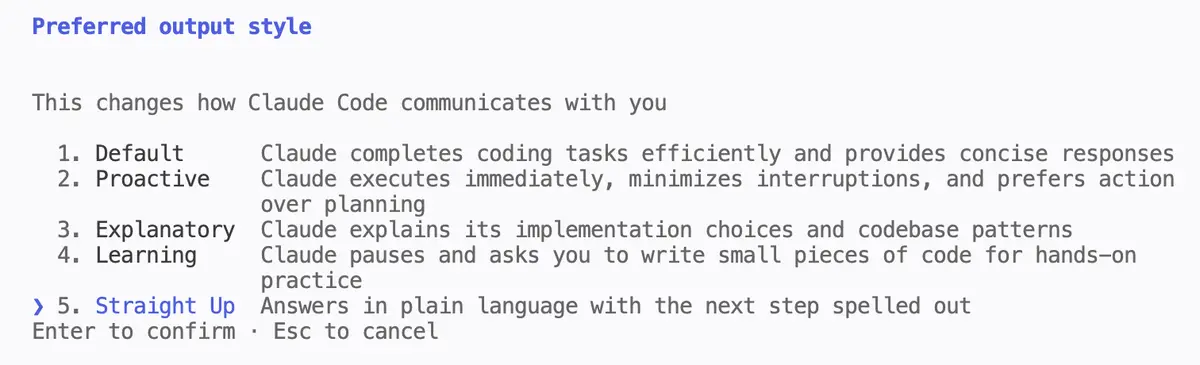
Two things to expect. Your pick applies to the project you are in, so opening a different project can give you a different style, and you set it again there. And the change starts on your next session, so run /clear or open a new one when you want it applied. /clear wipes the conversation you are currently in, so finish what you are working on first.
One more thing if you have notes from a while back. There used to be a dedicated /output-style command, and at the time of writing it has been retired: deprecated in Claude Code v2.1.73 and removed in v2.1.91. If you type it and nothing happens, that is why. The setting sits in the same list as the others worth changing early, which I covered in the Claude Code settings post.
Write Your Own Output Style
A custom output style is a markdown file: a short frontmatter block, which is the few settings lines fenced by --- at the top, and then plain instructions written the way you would explain your preferences to a person.
Where it goes. ~/.claude/output-styles makes the style available in every project, and ~ is your home folder. .claude/output-styles inside a repository scopes it to that project. The folder may not exist yet, so make it first, then save the file inside it with a .md extension:
mkdir -p ~/.claude/output-styles
The file name becomes the style name unless you set name in the frontmatter, so straight-up.md gives you a style called straight-up.
You do not have to write the file by hand, and I do not. It is ordinary markdown in a known folder, so you can just ask. Paste this into Claude Code and change the description to whatever you want:
Write me a Claude Code output style and save it to ~/.claude/output-styles.

I want answers that are short and in plain language, with no filler, and
every reply should end with what to do next. If there is a decision for me
to make, put the question on its own line with the options numbered under
it, and tell me which one you would pick.

Include keep-coding-instructions: true in the frontmatter. That keeps
Claude Code's built in coding habits, which a custom style otherwise
leaves out.
Then run /config, pick it, and /clear to start a fresh session, which is when the style loads. /clear clears your current conversation, so finish what you are doing first.
Here is the file I ended up with. I have been running it for about two weeks:
---
name: Straight Up
description: Answers in plain language with the next step spelled out
keep-coding-instructions: true
---

Explain everything like I'm very busy.

Small words. Short sentences. No fluff, no filler, no repeating yourself.
Fewest words possible. If you must use a big word, explain it right after.

Just say: what you did, did it work, what to do now.

If I have to decide something: put the question on its own line, as many
options as make sense, the context I need to pick fast, and always say
which one you'd go with.

Keep paths and commands exact.
One instruction in it does most of the work: the paragraph about decisions. Pulling the question onto its own line means the decision is visible without reading the paragraph twice to find it, and asking for the recommendation up front turns a list of technical options into a call you can accept or push back on. I later added numbering to the options in my project instructions, so I can answer "go with 2" instead of retyping an option back.
A minute gets you a working first version. Mine has been through several rounds since, each one shorter than the last, and none of them took long. If you want to build out a fuller custom setup than a single style file, that is the kind of configuration the workshop walks through live.
The switch shows up in the settings list, so you can always see which style is active:


The One Line That Keeps The Engineering Habits
Most of the file is your instructions. The settings lines at the top are short, and name and description are the two you will write yourself. There is one more setting line, and it is worth reading twice.
By default, a custom output style leaves out Claude Code's built in software engineering instructions. Anthropic's documentation puts it this way: "Custom output styles leave out Claude Code's built-in software engineering instructions, such as how to scope changes, write comments, and verify work, unless keep-coding-instructions is set to true." That default is false.
That default is deliberate. Output styles are also how you point Claude Code at work that is not software engineering at all, and for a writing assistant or a data analyst the coding instructions would only get in the way. It is documented behavior rather than a gotcha.
It does mean a style written purely to make answers shorter drops that guidance too, and the examples Anthropic gives are scoping a change, writing comments, and checking its own work. The fix is one line at the top of the file:
keep-coding-instructions: true
Be precise about what that line promises. The documentation says the instructions are kept, which is not the same as a guarantee that behavior is identical to Default in every respect, and your own instructions still sit alongside them. If you are staying in a codebase and only changing the voice, put the line in.
Where Output Styles Stop
One limit worth knowing before you build a workflow around this: subagents ignore your style.
Claude Code can hand a piece of work to a subagent, a separate helper session that runs on its own. That subagent gets its own system prompt, so your formatting instructions do not reach it. A fork is the exception, because a fork is a copy of your current session and inherits its full system prompt. If you dispatch a lot of work to subagents, especially in a dynamic workflow that can fan out to dozens of them, the style governs what you read at the end rather than what happens in the middle. Two sessions you deliberately set up to talk, rather than a subagent Claude spins up on its own, are a different mechanism again.
That is not a reason to skip this. It is the thing that would otherwise look like the setting failing when it is working exactly as designed.
Frequently Asked Questions
What are Claude Code output styles?
Claude Code output styles are a setting that changes the role, tone, and format of Claude Code's answers. Four styles are built in, and you can write your own as a markdown file. The setting changes how Claude responds rather than what it knows, so the model is unchanged.
How do I change the output style in Claude Code?
Run /config, find the Output style row, and choose from the list. The list includes the four built in styles and any custom ones you have saved. The change applies from your next session, so run /clear if you want it right away.
Why is my output style not working?
Four things to check. The style loads when a session starts, so a change applies from the next one, and /clear gets you there. You may have picked it in a different project, because the choice is per project. Subagents run their own instructions and ignore your style. And if you are typing /output-style, that command was removed in v2.1.91, so use /config instead.
Where do output style files live?
~/.claude/output-styles for a style you want available in every project, and .claude/output-styles inside a repository for one scoped to that project. The file name becomes the style name unless the frontmatter sets name.
Do output styles make Claude Code worse at coding?
They can. A custom style leaves out Claude Code's built in software engineering instructions unless keep-coding-instructions: true is in the frontmatter, and the default is false. Add the line and the documented instructions come back alongside your own.
What is the difference between an output style and CLAUDE.md?
A CLAUDE.md carries facts and rules about a project. An output style carries how you want to be spoken to. They also arrive differently: an output style goes into the system prompt, while a CLAUDE.md is added as a message after it. Use both, for different jobs.
