
← Back to blog7 min read
Claude Code cross session messaging lets one Claude Code session write a plain text message and send it to another session on the same machine. Across your machines it works one way only, as a reply. You never run a command to send one: you ask in ordinary English, and Claude finds the other session and writes the message itself. It needs Claude Code v2.1.224 or later at the time of writing.
Key Takeaways
- One Claude Code session can send a message to another one on the same computer, and can reply to one that arrives from another machine.
- What travels is a summary the first session writes. Your files and your conversation stay where they are.
- There is no command to run. You ask, Claude finds the other session, and it can also send one on its own when it sees the need.
- The three uses that earn their place: handing over before a session gets heavy, keeping two parallel branches of work in sync, and having long jobs report back.
- A delivered message counts toward your usage the same way a prompt you typed does.
Short on time? Jump to the 3 ways to use it, which is the part to act on today.
What Claude Code Cross Session Messaging Actually Sends
A message is a piece of text one Claude writes to another. It is not your conversation, and it is not your files. Anthropic's own docs say that to move a whole conversation or its context, you resume the session instead.
That single fact decides how useful this is to you, so it is worth sitting with before anything else. This is not context transfer. It is a shift handover. The session that has been working writes down what matters now, and the fresh session starts from that instead of from nothing.
Which is the point. A handover that copied everything would just refill the second session with the weight you were trying to escape.
Two rules govern how a message moves, and each one matters more than it sounds:
| Rule | What it means |
|---|---|
| Timing | The receiving session reads it between tool calls, the pauses between the steps Claude runs. If that session is idle, it starts a new turn |
| Route | On one machine, sessions find each other through files on disk, and a message travels between them over a local socket, never through Anthropic servers |
Two more things to know before you build a habit around this.
Claude can send one without being asked. If a change in one session breaks what another session is building on, Claude can warn that session before you notice. Useful, and worth knowing about rather than meeting by surprise.
A message is not free. Once it is delivered, it counts toward your usage the same way a prompt you typed does. It is still less than writing the handover by hand and pasting it in, which is the thing it replaces.
Sending Your First Message
There is nothing to install and nothing to configure. Sending itself is just an ask, and the rest is knowing whether your setup has the feature at all.
- Check your version. Run
claude --version. Cross session messaging needs v2.1.224 or later, and it runs on macOS and Linux but not on native Windows at the time of writing. On Windows you reach it through WSL 2. If/peersstill comes back as an unrecognized command after you update, something in your setup is switching it off, and the usual culprit is a privacy or telemetry setting. - Ask in plain English. In the session that is filling up, say what you want passed along and who to. Claude works out which session you mean and writes the message itself. Swap
plannerfor whatever your other session is called:
Brief the session called planner on what we just changed and what it
should not touch. Include the decision we made and why, the files
that are mid change, and anything already tried that did not work.
- Optional: run
/peersto see the names. You do not need it to send. It lists any subagents running inside this session, your other local sessions, and, while Remote Control is connected, your sessions on other machines and on the web. Remote Control is the connection that lets you steer a session from your phone or another device./peersis the short alias, and/list-agentsis the same command. - Optional: name your sessions with
/rename. Without a name, Claude Code derives one from the working folder, so you get something likemyapp-3f. Two sessions in the same repo look nearly identical that way, and it is easier to say "the session called planner" than to pick the right row out of a list. - Watch it arrive. The receiving session picks the message up at the next gap between steps, so a job already running keeps going.
If you have never opened the settings screen in Claude Code, the Claude Code settings I change first are worth ten minutes before you go further.
3 Ways to Use It
The habit underneath all three is the same. Hand work off in a brief instead of re explaining it, which is most of what I teach in the AI workshop and the reason it keeps paying off.
1. Hand over before the context window gets heavy
A session's context window is everything it is holding in mind at once: the conversation so far, the files it has read, the output of everything it has run. Past a certain point it gets heavy. Answers slow down and the thread gets harder to steer, and the fix has always been the same: open a fresh session and carry on there.
My own rule of thumb is about half the window. That is a working habit, not a documented threshold, and yours may sit somewhere else. What matters is the cost of acting on it. Until this arrived I wrote the handover document by hand every time. Now the session that is already full writes it, and the new session picks it up mid task.
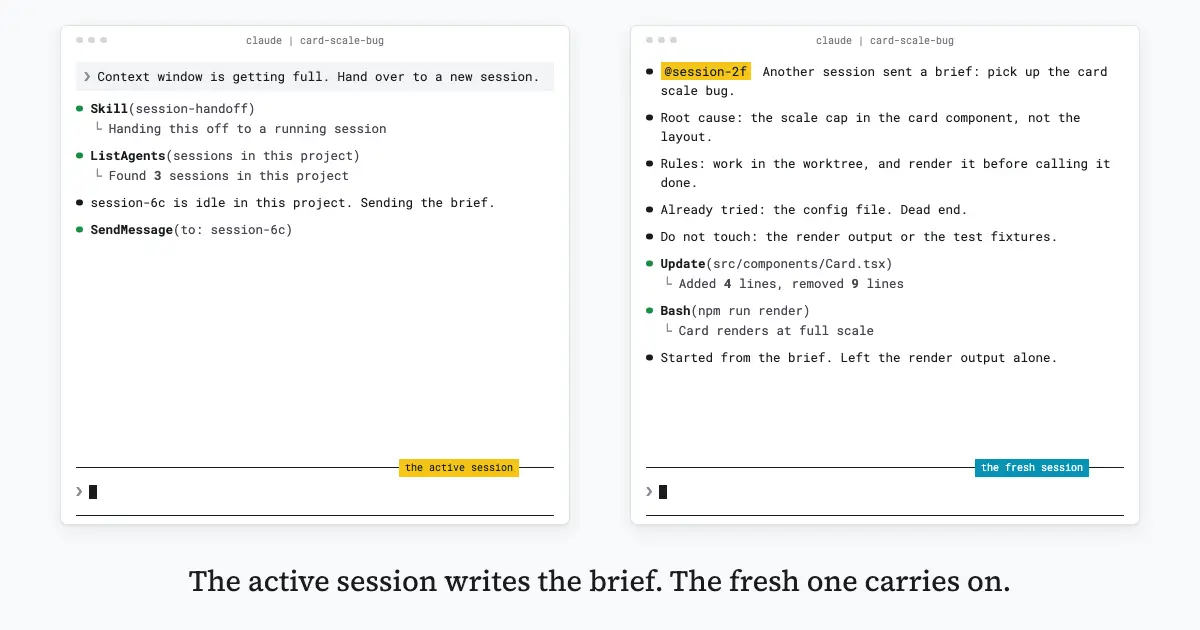
What earns its place in a good brief is narrow: the root cause in one line, the rules that apply, the trap already hit today, and a short list of what not to touch. None of that is history. All of it is decisions. Roughly this shape:
Root cause: the scale cap in the card component, not the layout.
Rules: work in the worktree, and render it before calling it done.
Already tried: the config file, which turned out to be a dead end.
Do not touch: the render output or the test fixtures.
One sentence starts it. The session finds the other one already open in the same project, sends the brief there, and the work carries on in a window that was sitting idle a second earlier.
2. Let two worktrees tell each other what landed
A git worktree is a second checkout of the same repository in its own folder, so you can have two branches open at once without switching between them. If you run two, you run them because you want two pieces of work moving at the same time.
The thing that goes wrong is not the code, it is that neither side knows what the other just changed until a merge tells you. A message closes that gap in both directions, and the ask is one sentence:
Tell the session in the other worktree what I just changed in the auth
layer, and which files it should leave alone until I merge.
3. Have long running work report back
A migration, a big test run, or a long refactor does not need you watching it. Ask the session running it to report back to the session you are actually working in, and the result arrives when it is done instead of you checking every few minutes. It works from the other side too: from the session you are sitting in, ask for a status and it comes back without you leaving.
When the migration finishes, tell the session called planner what
changed and whether rebasing on main is safe.
Subagent, Agent Team, or a Message?
The tempting move is to reach for a message to keep a big job out of your main context window. A subagent already does that. It runs in its own context window and hands back only a summary, and you can watch it and steer it while it runs.
Between those two, the choice is not about saving context. Both save it. It is about what you are running. A subagent is a helper inside one session. Cross session messaging is for independent sessions you started and steer yourself.
Claude Code has a purpose built answer for each of the neighboring cases:
| What you want | Reach for |
|---|---|
| A helper inside your current session | A subagent |
| A set of sessions Claude spawns and supervises | An agent team |
| To watch and steer many sessions from one place | Agent view |
| To carry a whole conversation into a new session | Resume the session |
Worth knowing on the subagent side too: the dynamic workflows setting caps how many agents a single run can spread across. Different mechanism again, a setting you change rather than a place you put the work.
Where Cross Session Messaging Stops
Four limits worth knowing before you build a habit around this.
Across machines, you can only reply. On one computer this is simple. Reach for a session on another of your machines or on Claude Code on the web, and Claude here cannot start the conversation. It can only answer a message that arrived from that session first, and that reply travels through Anthropic servers rather than staying on your machine. So a habit built around briefing your laptop from the web, on demand, does not work, and that is the assumption most likely to waste an afternoon.
A container cannot reach the host. Sessions find each other through files on disk, so a session inside a container and a session on your host machine cannot see each other at all. Two sessions inside the same container still can. If you work in a dev container, this is the limit you will hit first.
A message cannot approve anything. It never counts as your consent, so a pending permission prompt still waits for you. A slash command written inside a message arrives as plain text and does not run.
Delivery is not guaranteed. Two ordinary sessions that still prompt you for permissions will pass messages fine. The case to watch is a session running with permission prompts skipped. By default it holds arriving messages for your approval instead of delivering them, unless the sending session is also skipping prompts, and a held message reads exactly like the feature being broken. A session can also be set to accept or refuse everything outright, in its settings.
Frequently Asked Questions
How do I send a message to another Claude Code session?
Ask your current session in plain English to tell the other session what you want it to know, naming that session. Claude finds the target and writes the message itself, so there is no command to run and nothing to set up first. Running /peers beforehand is only useful when you want to see the names for yourself.
Does cross session messaging transfer my context?
No. Cross session messaging sends a plain text summary that one Claude writes for another, never your conversation history and never your files. To carry a whole conversation forward, resume that session instead of messaging it.
Does a message cost me anything?
Yes. Once a message is delivered, it counts toward your usage the same way a prompt you typed does. It is still less than writing the background out by hand and pasting it into a fresh session, which is what it replaces.
What is the difference between /peers and /list-agents?
They are the same command. /list-agents is the full name and /peers is the shorter alias, so use whichever you will remember.
Does cross session messaging work on Windows?
Not on native Windows at the time of writing. Cross session messaging runs on macOS and Linux, and Linux inside WSL 2 counts, so a Windows machine reaches it through WSL 2 rather than directly.
Can Claude message another session without me asking?
Yes. Claude can send one on its own when it sees the need, such as after making a change that affects work another session is doing. That message counts toward usage like any other.
Can two Claude Code sessions message each other in a loop?
An exchange that starts looping stops on its own. Claude Code rate limits repeated messages from the same sender, drops identical repeats sent close together, and caps how many messages a session will hold waiting to be read.