
Claude Prompt Caching Runs on a Clock, Not a Budget
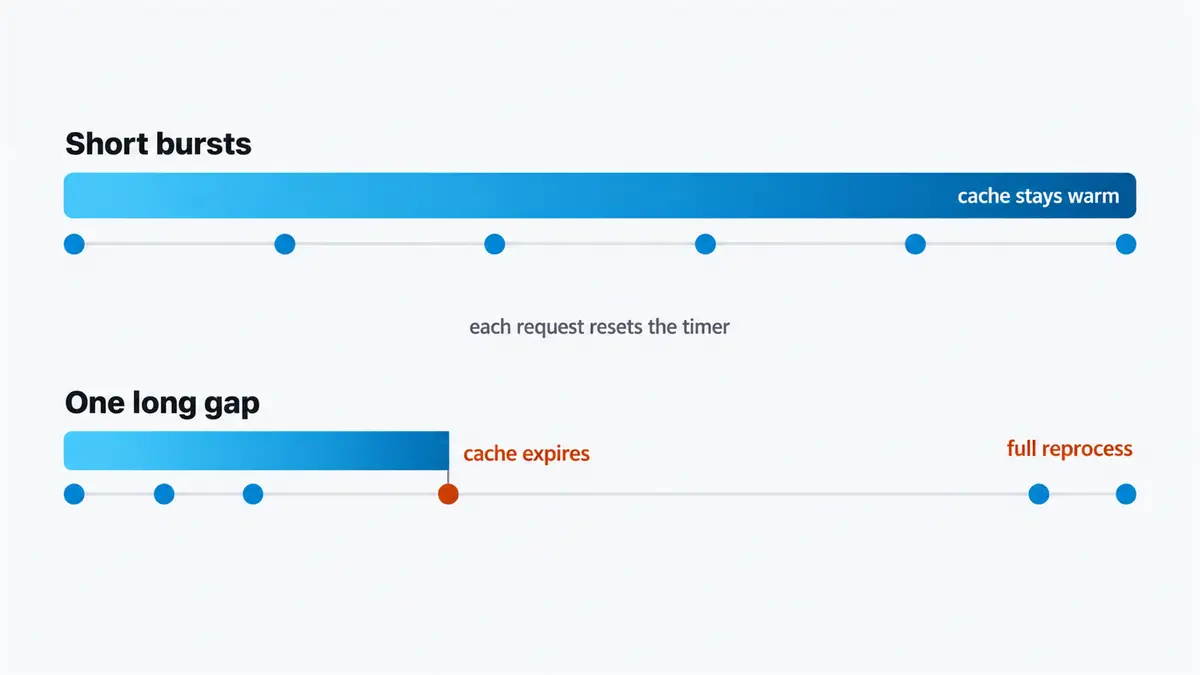
Claude prompt caching is time based. In Claude Code, the cached copy of your conversation expires on a timer, every request you send resets that timer, and once it runs out the next message reprocesses the whole history at full price. Work in short bursts and the cache never goes cold. Step away for an hour and the first message back pays for everything.
Caching reads like a size problem. It is a timing problem, and the timer runs when you stop working.
If you want the short version, jump to the 3 habits.
Key Takeaways
- Claude prompt caching expires on a timer: about 1 hour on a plan within usage limits, about 5 minutes on API or cloud, 5 minutes for subagents everywhere.
- Every request resets that timer. The cache goes cold because you stopped working, not because the session got long.
- Run
/usageto see what share of your input came from cache. It should be high.- A one hour window is billed at a higher write rate, so short bursts are usually cheaper on the short window. Only lengthen it if you actually step away and return.
/compactis cheap while the cache is warm and full price on a resumed session. Run it before you step away.- Switching models, changing effort, or adding an MCP server all rewrite the front of the request and invalidate everything after it.
- Editing files, changing permission mode, and editing CLAUDE.md mid session are all free. CLAUDE.md is only read at session start.
- Fable 5.1 is the one model where changing effort keeps the cache.
What is Claude prompt caching?
One prompt is many requests, and every request carries the entire conversation. Your system prompt, your tool definitions, your CLAUDE.md, every message and tool result so far, all of it goes back to the model on every single turn.
The part at the front that is identical to the previous request is called the prefix, and that is what gets cached. It is read back for a small fraction of the normal input price. New material pays full price once, and from the next request on it is inside the cached prefix too.
Claude Code sets all of this up for you. You do not turn it on. What you control is whether you keep breaking it.
This is the biggest lever you have, because nearly everything that goes into a request is prefix. In a healthy session, most of your input is the cheap cached kind.
How do I check if my cache is actually working?
Run /usage. There is a line for the prompt cache, and it shows exactly how much of your input came from cache.
In a healthy session that number should be high. There is no published floor to measure yourself against, so read it as a trend rather than a score: check it early in a session and again after an hour of work. A drop is the signal. If it is low, you are breaking the cache somewhere, and the sections below are the list of ways that happens.
The companion command is /context, run in a fresh session. It shows what you are actually sending before you send anything: system prompt, loaded tools, your CLAUDE.md, your skills, your MCP servers, with token counts against each. Worth a look before you start something long, if only to find the thing you forgot you had loaded.
How long does the cache last, and what resets it?
How long is the window?
It depends on where you are running, and the gap is large. These are the numbers today, and they are the kind of thing that moves.
| Where | Cache lifetime |
|---|---|
| Claude Code on a plan, within your plan's usage | About 1 hour |
| API billing or a cloud provider | About 5 minutes |
| Subagents, everywhere | 5 minutes |
Subagents are the exception worth remembering. They get 5 minutes regardless of what your main session is set to.
Does using the cache reset the timer?
Yes, and this is the whole trick. The server keeps the prefix around for a limited time, and every request you send resets that timer. While you are working, the cache stays warm.
So the cache does not expire because your session got long. It expires because you stopped.
That inverts the usual instinct. A 4 hour session where you send a message every few minutes stays warm the entire time. A 20 minute session with a 90 minute lunch in the middle goes cold once, and the message after lunch costs more than any message in the 4 hour one.
Should I set the cache window to an hour?
Not automatically, and this is the part that gets skipped.
There is a promptCacheTtl setting for the main conversation and a matching subagentPromptCacheTtl for subagents, in ~/.claude/settings.json alongside the rest of your settings, or in managed settings for a whole team:
{
  "promptCacheTtl": "1h",
  "subagentPromptCacheTtl": "1h"
}
But the long window is not free. Writing tokens into a 1 hour cache is billed at a higher rate than writing them into a 5 minute one. So if you work in steady bursts and rarely pause for more than a few minutes, the short window is usually cheaper, because you would be paying extra for time you never use.
The long window pays off when you genuinely do step away and come back to the same session. A meeting, a lunch, a long build. Match the setting to how you actually work, not to the bigger number.
On a subscription plan you are working against usage limits rather than a per token bill, so the practical cost of a cold cache is limit consumed rather than dollars charged.
What breaks the prompt cache?
Expiry is one way to lose the cache. Changing the front of the request is the other.
The server can only reuse the part of the request that is identical to the previous one, starting from the very first token. The moment one token differs, everything after that point is new and gets processed at full price.
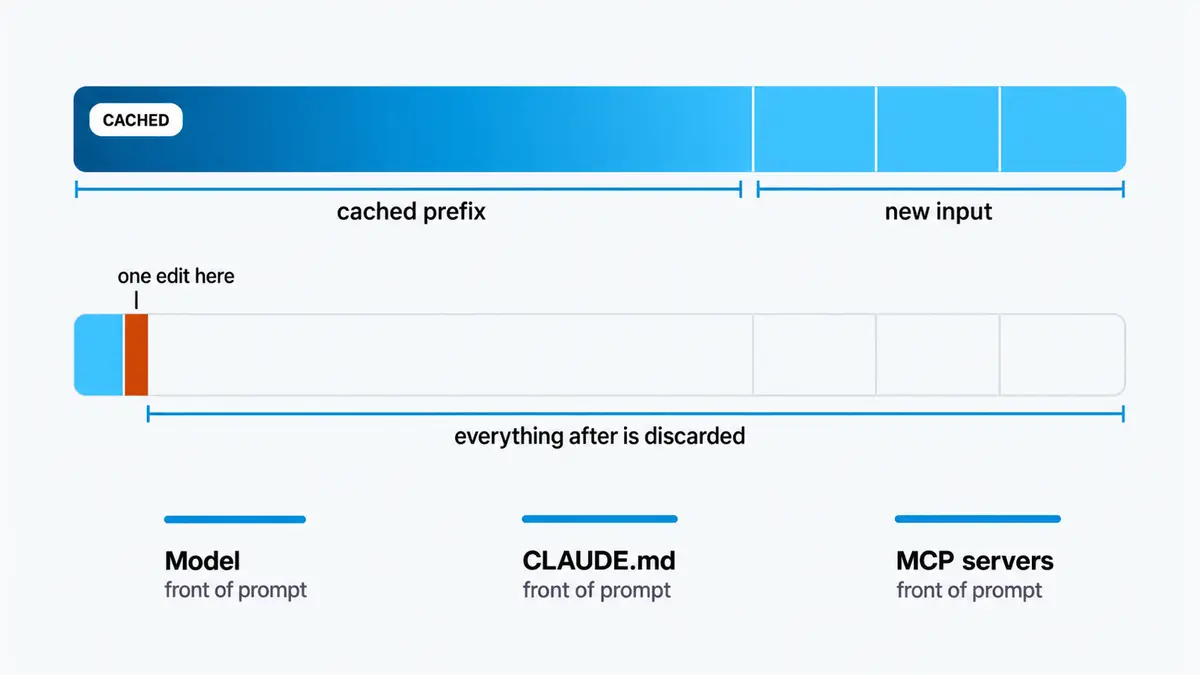
That prefix contains more than your conversation:
| In the prefix | Which means |
|---|---|
| Tool definitions | Adding or removing an MCP server rewrites the front |
| System prompt | Includes your working directory and a snapshot of your git state from session start |
| Your CLAUDE.md | Read once, at session start |
| The conversation so far | Everything, in order |
So the things that break it are the things that sit in front of your request:
- Switching models mid session. The cache is that model's own internal state, so a different model has nothing to reuse and reads your whole conversation fresh once.
- Changing effort level, on most models. Effort is how thorough the model is before it calls the job done, set with
/effort. More on the exception below. /compactand/clear. Both rewrite everything leading up to this point, so both break the cache by definition. After a compact that is just a short summary, so it is usually fine.- Adding or removing an MCP server, which changes the tool definitions.
Claude Code usually warns you about the first two. Run /model or /effort while the cache is still warm and it will normally ask you to confirm first.
What is safe to change mid session?
More than you would think, which saves tiptoeing around things that cost nothing.
Editing files is free. So is changing permission mode. Those are Claude Code side and never touch your request.
Editing your CLAUDE.md mid session does nothing at all. It is read once, at session start. Change it now and nothing changes in this session. It shows up in your next one, or after you clear.
The Fable 5.1 exception
Changing effort level normally throws the cache away, because on most models the effort setting is part of what gets cached.
Fable 5.1 is the exception. On Fable 5.1, changing effort keeps the cache. It is the only model where that is true.
That makes effort a dial you can turn during a session rather than a decision you are locked into. Drop it for a stretch of mechanical edits, raise it for the hard part, and the conversation history stays cached across both. On any other model, the same move costs you the entire prefix.