
← Back to blog8 min read
Claude Code slash commands are typed instructions that control the session itself rather than the code, and the official reference listed 106 of them at the time of writing, three marked as removed, so 103 were live. Nobody uses 103. Three of them carry most of a normal working week: /plan before anything gets written, /goal when a task has a finish line, and /rewind when the session goes somewhere bad. This post covers what each one does, the part of each that is easy to miss, and how to turn a file on your machine into a command of your own.
Key Takeaways
- Claude Code carries over a hundred slash commands. Your own menu may be shorter, because availability depends on your plan and platform.
/planenters plan mode from the prompt, and you can hand it the task on the same line./goalsets a condition Claude keeps working toward across turns, instead of stopping at the end of one reply./rewindopens a menu that can restore your code, your conversation, or both, and answers to/checkpointand/undoas well.- You build your own command by writing a skill, and it then answers to its own name. Older command files still work.
What Is a Claude Code Slash Command?
A Claude Code slash command is an instruction you type at the start of a message, beginning with a forward slash, that changes how the session behaves rather than asking Claude to do work on your files. Typing /model switches models. Typing /context draws what is currently filling the context window. The command only counts at the start of a message, and any text after the name becomes its argument.
Type / on its own to see the list, then keep typing letters to filter it.
Why Your Command List Looks Shorter Than Mine
Not every command appears for every person. Availability depends on your platform, your plan, and your environment, so a command that exists in the reference may simply not be in your menu. /desktop only shows on Mac and on x64 Windows with a subscription, and /upgrade does not show on Enterprise plans at all.
A command missing from your menu is the usual explanation when one seems not to work. Before assuming a list is wrong, type / in your own session and filter for the name. If it is missing there, it was never available to you in the first place.
How Many Slash Commands Does Claude Code Have?
Claude Code had 103 live slash commands at the time of writing. That figure comes from counting the rows of the official commands reference: 106 rows in total, three of which are tombstones for commands that have been taken out.
There is no official headline total, so this is a count I ran rather than a number to quote back at anyone. Run the count a month from now and it will be a different number, which is why it is worth knowing how to run it rather than which number I got.
What Happened When I Checked My Own Cheat Sheet
I keep a personal list of the commands I use, and I sat down to check it against the official reference rather than trusting it. That count is where the 103 comes from. My own list had run for months without one.
The three tombstones tell you why the check was worth doing. /pr-comments was taken out at version 2.1.91, /vim at 2.1.92, and /ultraplan is gone in favour of plan mode. None of those announced itself to me. Any command list you saved months ago is describing a version of the tool you are no longer running, and the only way to find out is to count.
Jump straight to the useful part: the 3 commands below are the ones I would start with.
/plan: See the Approach Before a Line Gets Written
Planning matters more with AI work than with most work. A model that has misread the task will write the wrong thing very quickly.
What Does /plan Do?
/plan puts the session into plan mode directly from the prompt. In plan mode Claude works out an approach and shows it to you before touching any files, so the expensive part of the mistake happens in text you can read rather than in a change you have to undo.
Can You Pass /plan the Task on the Same Line?
Yes. Pass a description and Claude enters plan mode and starts on that task immediately, as in /plan fix the auth bug. It saves a round trip, and it is documented behaviour rather than a workaround, so nothing about it is fragile.
/plan add rate limiting to the public API routes
Read the Plan. That Is the Whole Pro Tip.
The habit that actually saves time is the boring one: read what comes back, and change it before saying yes. A plan you skimmed is a plan you will be debugging later, and every wrong turn you approve spends your allowance as well as your time.
If the plan is long or dense, ask for a summary section with the key points at the top, then read that and dip into the detail where it matters. Getting more out of a model usually comes down to how the request was framed, which is the same skill as prompting well.
/goal: Set a Finish Line and Let Claude Run to It
/goal is the one on this list that changes the shape of a session rather than one step in it, and it is the newest of the three.
What Does /goal Do?
/goal sets a condition, and Claude keeps working across turns until that condition is met or the goal clears for another reason. The normal rhythm of a session is that Claude does a chunk of work and stops to hand back to you. A goal replaces that stopping point with a finish line, so the work continues until the finish line is crossed rather than until the reply ends.
Run it with no argument and it shows the current goal, or the last one that was achieved.
/goal npm test and npx tsc --noEmit both exit clean
How Do You Clear a Goal?
Any of clear, stop, off, reset, none, or cancel removes an active goal early. Six words for one action is unusual, and it means the word you guessed is probably the right one.
Stack the Goal With a Verification Step
A goal is only as good as the condition, and a vague condition is met the moment Claude decides it has been met. What makes one hold is writing the condition so it can be checked by running something, not by reading something. Put the check inside the condition itself, so the goal names the command that has to exit clean rather than a state Claude gets to judge for itself.
A goal also has a real cost. Work that continues across turns keeps spending your allowance across turns, which is worth knowing before you set an open ended one. I measured how far a single goal actually gets on a plan when I ran the same command on Codex, and the answer was further than I expected and not free.
/rewind: Roll Back the Conversation, the Code, or Both
/rewind opens a menu listing every prompt you sent this session, and the part people miss is that it can take your code back as well as the conversation. This is the escape hatch for the session that has gone somewhere bad and is getting worse with each attempt to fix it.
You pick the point, then you pick what moves. Restoring both code and conversation is one option. Restoring only the conversation and keeping your current code is another, and so is the reverse. The two code options only appear when that checkpoint actually has file changes to revert, so a menu offering fewer choices is telling you nothing was edited after that point.
Checkpointing captures your code before each prompt you send, so the safety net is there before you think to ask for one. Know what it covers: the edits Claude makes with its own file editing tools. Files changed by a bash command, and edits made by a subagent, are not restored, with one narrow exception for a skill running forked in the foreground. Git is still the thing standing behind this.
Is /checkpoint the Same as /rewind?
Yes. /checkpoint and /undo are both aliases of /rewind, so all three open the same thing. If someone describes this feature using a different word than you use, you are talking about the same command.
/fork and /branch Are Not the Same Thing
These two are easy to read as one command, and they are not. /fork copies the conversation into a new background session and leaves you working where you are. /branch creates a branch at this point and switches you into it, keeping the original for you to return to. One hands the copy to a background session, the other moves you. Neither is the same as getting two Claude Code sessions talking on purpose, which is a different mechanism again.
The /fork description assumes Claude Code v2.1.212 or later. Run claude --version to see which you are on. On v2.1.161 through v2.1.211, /fork does what /subtask does now, and /subtask does not exist. Turning agent view off produces the same split on any version. That is the same drift this post is about, showing up inside the example I picked to explain it.
Keep your list dated rather than memorised, because commands move without announcing it. /agents used to open a management interface and now prints a reminder to ask Claude directly instead. /pr-comments was removed outright. Both were still in my notes as working, and I found out by checking.
The Commands Worth Knowing After the First Three
Three commands cover most of a working week. These are the ones I reach for next, and each earns its place for a different reason.
| Command | Reach for it when |
|---|---|
/context |
The session feels slow or forgetful and you want to see what is filling the window |
/compact |
The window is full but the conversation is worth keeping, and you can pass focus instructions to protect what matters |
/btw |
A side question needs answering without adding to the conversation |
/subtask |
A piece of work can run in the background and report back while you keep going (v2.1.212 or later) |
/insights |
You want a read on your own habits, across recent sessions on this machine |
/effort |
The task is harder or simpler than the default reasoning level suits |
/insights in particular is a mirror rather than a tool, and it is worth running once just to see what your own week looks like from the outside. I wrote about what the report actually surfaces separately.
How Do You Make Your Own Slash Command?
The way to build a custom slash command now is to write a skill, and old .claude/commands/ files keep working. A skill is a SKILL.md file of instructions that Claude reads when it becomes relevant, and it can also be invoked directly by name, so a skill at .claude/skills/deploy/SKILL.md answers to /deploy in your session.
That is the real payoff in this whole topic. Every repetitive instruction you retype, the linting rules, the deployment steps, the testing conventions, the way you want a review done, becomes a command instead of a paragraph you keep writing again. I keep a self improving skill that updates itself as I correct it, which is only possible because a skill is a file rather than a setting.
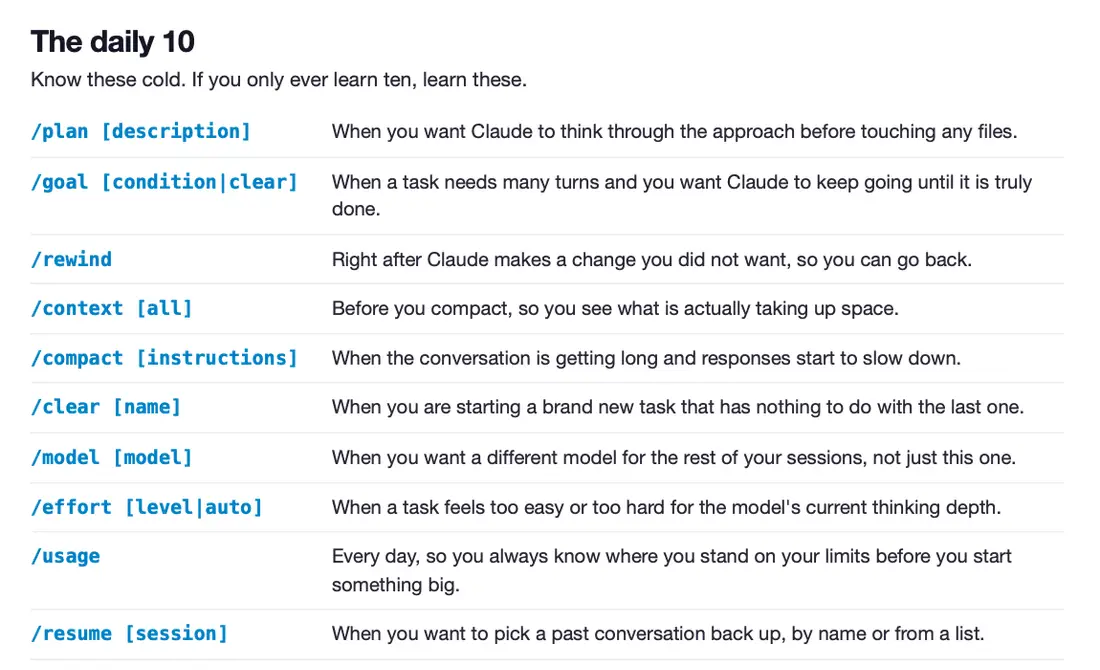
The full handout below has a page on turning one of these into your own command, along with every command ranked by how often it earns its place.
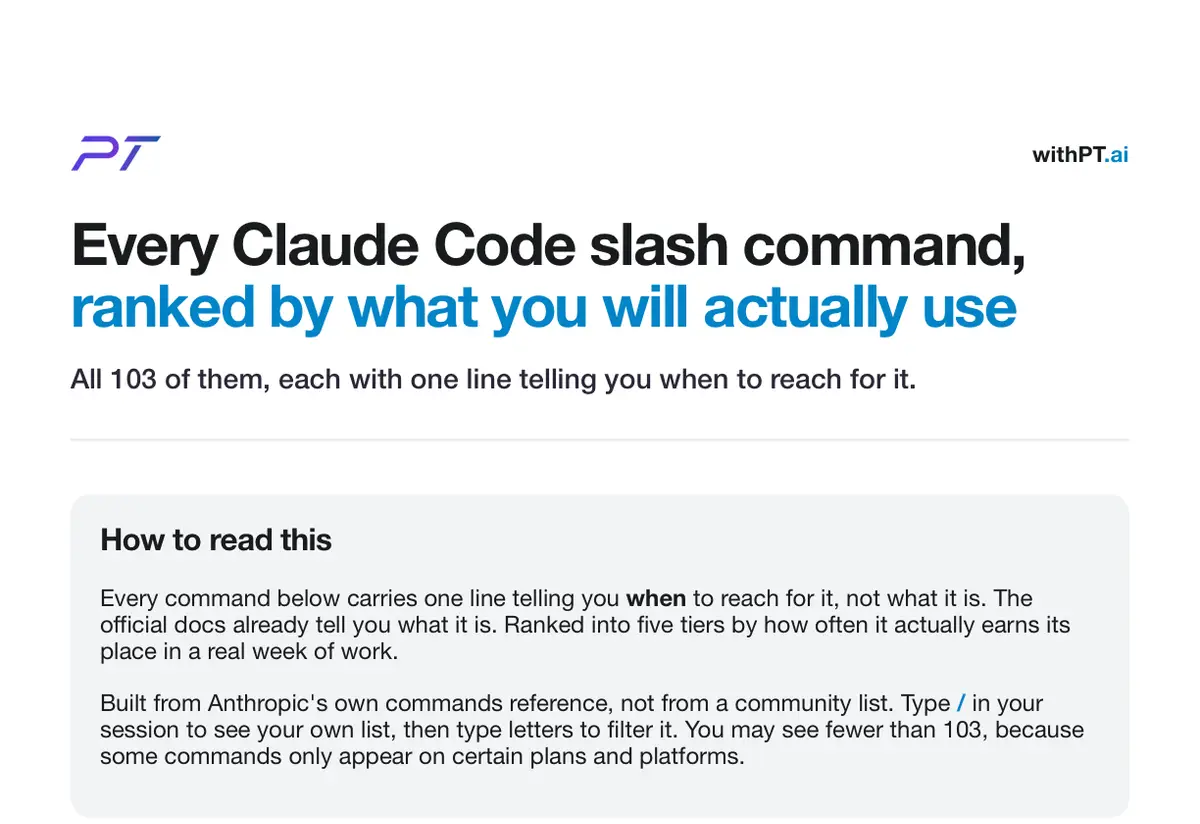
Its top tier is a page called the daily 10, which is the shortlist I would hand someone on their first week. It widens the three above with the session housekeeping you end up needing anyway, /clear and /model and /usage and /resume.
If you would rather learn this side by side than from a page, that is what the workshop is for.
Frequently Asked Questions
Do you need to memorise the slash command list?
No. Type / in your session and Claude Code shows the commands available to you, filtered as you keep typing. The list is long enough that memorising it is wasted effort, and it changes often enough that a memorised version goes stale without telling you.
Why does a slash command say unknown command?
An unknown command almost always means that command is not available to you rather than that you typed it wrong. Availability depends on plan and platform, and Claude Code leaves unavailable commands out of the menu entirely. Type / and filter for the name to confirm whether you have it.
What is the difference between /clear and /compact?
/clear starts a new conversation with empty context, so the previous conversation is set aside rather than carried forward. /compact keeps the same conversation going and frees space by summarizing what came before, and you can pass focus instructions telling it what to keep in that summary.
Can you undo a change Claude Code made to your code?
Yes, with one limit worth knowing. /rewind opens a menu where you pick an earlier point and then choose what to restore: the code, the conversation, or both. Checkpointing captures your code before each prompt you send, but it only tracks edits Claude made with its own file editing tools, so changes made by a bash command or by a subagent are not restored. /checkpoint and /undo open the same menu.
Do custom slash commands still live in a commands folder?
Both work. Custom commands have been merged into skills, and a file at .claude/commands/deploy.md and a skill at .claude/skills/deploy/SKILL.md each create /deploy. Existing command files keep working, so there is nothing to migrate. If both exist under the same name, the skill wins.
Which slash command should you learn first?
Start with /plan. It fits in front of any task you were about to start anyway, and it catches the most expensive category of mistake, which is a model confidently building the wrong thing.