Claude Code Spinner Verbs: Make It Say Anything You Want
I have watched that little word next to the spinner thousands of times. Marinating. Noodling. Clauding. I never once thought of it as something I could change, until somebody mentioned it and I went looking that same night. It turns out Claude Code spinner verbs are a real setting, and you can put whatever words you want in there.
This post covers the prompt to paste, the two modes it can run in, and where to find a few thousand verbs somebody else already wrote.
Key Takeaways
The word that flickers while Claude Code is working is not fixed. You can change it to whatever you like.
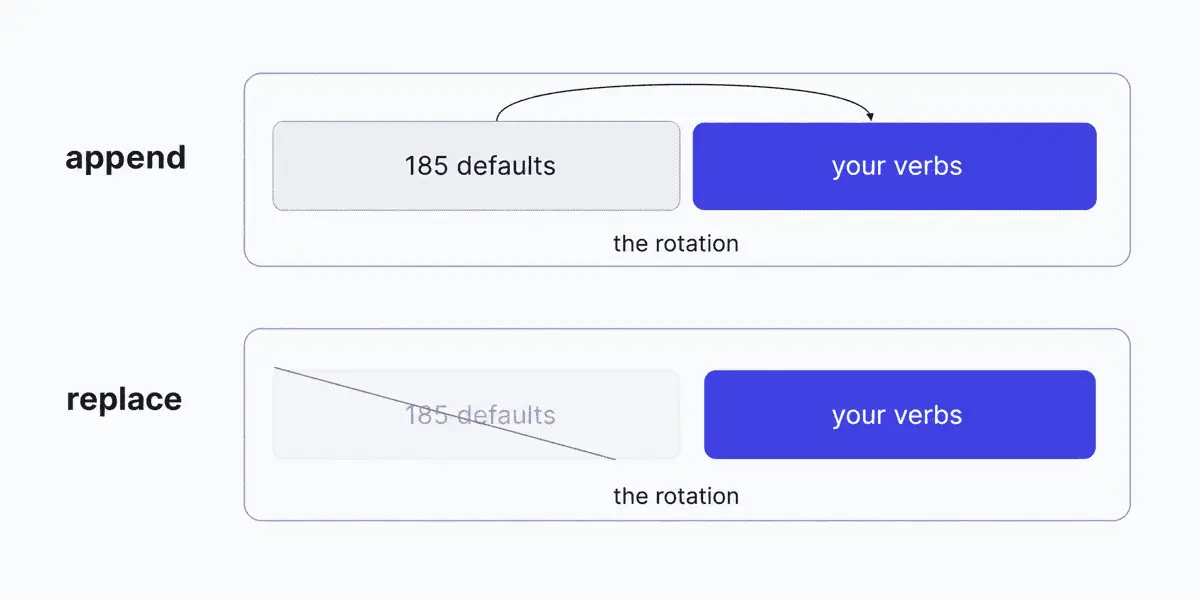
Claude Code comes with 185 of these words. You can add your own to that list, or swap the list out entirely for yours.
It takes one small block of text in a settings file. You can also just ask Claude Code to add it for you.
Somebody has already written out 3,084 of them, sorted into themes, free to copy.
None of this changes how Claude works. It only makes the tool feel like yours, which is the whole point.
What Are Claude Code Spinner Verbs?
Claude Code spinner verbs are the rotating action words shown beside the loading spinner while a turn is in progress. When you send a prompt and Claude starts working, the terminal shows a spinner and a word: Pondering, Simmering, Perambulating. The word changes as the turn runs. It is cosmetic. It exists so the wait feels like something is happening rather than nothing.
Claude Code ships with 185 of these built in, and they are a genuinely strange list. Bloviating. Flibbertigibbeting. Razzle dazzling. Whatchamacalliting. Somebody at Anthropic sat down and wrote those out on purpose, which tells you the feature was never meant to be serious.
What most people miss is that the list is yours to change.
How to Change Claude Code Spinner Verbs
You do not have to open a settings file or write any JSON. Paste this into a Claude Code session and it will make the change for you:
Add these spinner verbs to my ~/.claude/settings.json using "mode": "append":

Percolating, Untangling, Rummaging, Squinting, Rewiring,
Scheming, Puttering, Unsticking, Wrangling, Backtracking

If a spinnerVerbs block is already there, add to its verbs array
rather than replacing it. Show me the block before you write it.
Swap my ten words for your own. The last line is the part worth keeping: it makes Claude show you the change before it touches your settings file, so you can see what is about to happen.
Claude writes the block into ~/.claude/settings.json, which is your user settings file and applies everywhere you run Claude Code. Start a fresh session and your words are in the rotation. This is also the route the collection below recommends, and it is much faster when you are pasting in fifty verbs instead of ten.
Append or Replace
The mode key decides whether your words join the defaults or take over from them. Pick based on how much of the original character you want to keep.
Mode
What happens
Pick this when
"append"
Your verbs are added to the 185 built in ones
You want your words in the mix without losing Marinating and Clauding
"replace"
Only your verbs are used, defaults ignored
You want a single consistent theme every time
"append" is the safer starting point. With a short list in replace mode you will see the same three words all day, and the novelty dies fast. The defaults are doing more work than they look like they are.
The Two Other Spinner Settings
The verb is not the only part of that line you can change. Two neighbouring settings control the tip text, which is the hint that appears alongside the spinner rather than the action word itself. All three are documented on the same settings page.
None of these three change what Claude writes back to you. For a setting that actually does, see output styles.
spinnerTipsOverride is the one worth a second look if you work with other people. Its own documented example is an internal tool reminder, which points at a real use: a team can put a house rule in front of everyone who runs Claude Code, in the one place they are already looking while they wait.
Where to Get Verbs Worth Using
Writing fifty good verbs yourself is harder than it sounds. Somebody already did it. This public collection catalogues, by its own count, 3,084 verbs across 106 themed categories, the 185 defaults included.
The categories are the fun part. Gen Z. Noir Detective. Gym Bro. Bureaucracy and DMV. Hustle Culture. Linkedin Speak. Star Wars, Studio Ghibli, Monty Python, Godzilla. You copy the block you want out of the README and paste it into your settings.
Pick a theme that matches the work rather than one that fights it. A long refactor reads differently with detective verbs than with theme park operations verbs, and that is a real if very small difference in how the hour goes.
Why Bother With Any of This
Nothing here makes Claude Code faster or better at its job. The verb is decoration.
I had been meaning to try this for a while, and what actually got me was the realization that it was possible at all. I had read that line hundreds of times and never once thought of it as mine. It turns out a fair amount of the tool is like that: configurable in places you assumed were fixed, and nobody tells you because it does not affect output. That is exactly the kind of thing insights tends to surface, features sitting there unused.
That is the thing worth taking away, more than the verbs. AI tooling gets talked about entirely in terms of capability, and the small human parts get treated as noise. They are not nothing. You sit in front of this thing for hours. Having it say words you picked, in a voice you find funny, is a better afternoon than having it say words a stranger picked.
It does not all have to be so serious. If you are working through the rest of your setup, I cover the settings that do change behaviour in my settings post, and the workshop walks through the whole configuration end to end.
Frequently Asked Questions
Do I need to restart Claude Code after changing spinner verbs?
Start a fresh session after editing settings.json. Settings are read when a session begins, so a session already running will keep using the list it started with.
Where does the spinnerVerbs setting go?
In a settings.json file. Start with the user level file at ~/.claude/settings.json, which applies everywhere you run Claude Code. Claude Code reads settings from several locations with a defined order of precedence, documented on the settings page.
Can I use emoji or multiple words as a spinner verb?
The setting takes an array of strings and does not restrict what those strings contain. The built in list includes hyphenated and compound forms like Razzle-dazzling and Fiddle-faddling, so multi word entries are clearly acceptable. Keep them short. The line has limited room and a long verb reads badly next to the spinner.
Does changing spinner verbs affect how Claude Code performs?
No. Spinner verbs are display text shown while a turn runs. They have no bearing on the model, the response, or how fast anything completes.
How many spinner verbs does Claude Code have by default?
185 ship built in, and they rotate at random through a turn. They include Thinking, Pondering, Marinating, Clauding, Noodling, Bloviating, and Flibbertigibbeting.