
← Back to blog5 min read
There are more than 200 Claude Code plugins, and you need a handful of them. The fastest way to find which ones is the automation recommender, a read only skill made by the Claude Code team that reads your project and names the exact plugins, skills, hooks, subagents, and MCP servers worth adding. You ask it, it looks at your actual codebase, and it hands you a short list picked for your stack. This post covers what it is, why starting from the full plugin list is the wrong move, and how to run it yourself.
Key Takeaways
- There are more than 200 Claude Code plugins in the official marketplace, and most projects need only a few of them.
- The automation recommender is a skill inside Claude Code's official setup plugin. It reads your codebase and recommends what to add, picked for your stack.
- It covers five kinds of automation: MCP servers, skills, hooks, subagents, and plugins. Most people turn on one and leave the rest empty.
- It is read only. It never changes a file. It tells you what to add and why, and you decide.
- You install it from Claude Code's official marketplace, then ask it in plain language, like "recommend automations for this project."
What Is the Claude Automation Recommender?
The Claude automation recommender is a skill that reads your project and recommends the automations worth adding, across every way Claude Code can be extended. You ask it to recommend automations, it profiles your actual codebase, and it returns the top one or two picks per category with a short reason for each. It does not just look at plugins. The recommender checks all five extension types and tailors the list to what you are building.
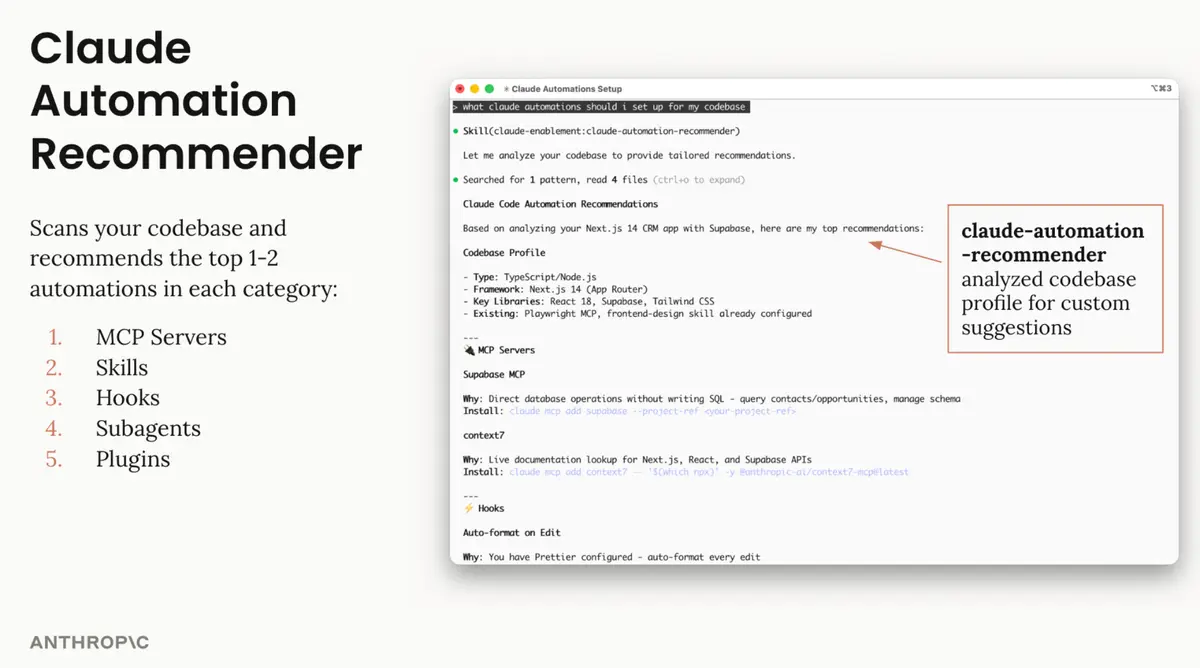
One wording note, so a Claude Code power user does not catch you out. The recommender is technically a skill, packaged inside Claude Code's official setup plugin. You install it as a plugin and it runs as a skill. Either way, the job is the same: it reads your project and tells you what to add.
Why More Than 200 Claude Code Plugins Is the Wrong Place to Start
The Claude Code plugin marketplace has grown past 200 entries, and the number keeps climbing. Scrolling that list to guess what you need is the slow path, and it is easy to install a pile of plugins you never use.
There is also more to Claude Code than plugins. The recommender covers five kinds of automation, and each one does something different:
| Extension type | What it does | When to add one |
|---|---|---|
| MCP servers | Connect Claude to outside tools and data | You want Claude to reach your database or docs |
| Skills | Give Claude a repeatable way to do one task well | You do the same kind of task often |
| Hooks | Run your own commands automatically | You want a rule enforced every time |
| Subagents | Hand a job to a separate Claude with its own context | A big job is crowding your main thread |
| Plugins | Bundle any of the above into one install | You want several of these at once |
Most people switch on one of these and leave the other four empty. That is the real gap. The recommender exists so you do not have to learn all five surfaces before you get a setup that fits your work.
The Five Claude Code Extensions It Checks
Here is the part that matters: the recommender does not scan all 200 plugins one by one. It reads your repo, works out what you are building, and recommends from there. It looks at your framework, your libraries, and the tools you already have configured, then names the one or two additions per category that would actually help.
That means the output is specific to you, not a generic starter list. On a coded project it profiles the stack. On a workspace with little to automate, it correctly recommends almost nothing, which is a feature, not a miss. A short, tailored list beats 200 options you have to sort through.
One It Flagged in My Own Setup
I already knew about Context7, an MCP server that pulls the current documentation for whatever library I am working with, so Claude writes against the live version instead of guessing from older training data. I keep my MCP servers to a minimum on purpose, so even though I knew this one existed I had left it off. That used to be about the tokens each server spent at the start of a session, which has since changed. What still makes a server worth keeping is covered in the post on the best MCP servers.
What changed my mind was seeing it recommended for my own work. The recommender read my actual codebase, saw the kind of project I was building, and put Context7 on the list. That is different from a tip I read somewhere. It was a read of my own repo saying this would help, so I installed it, and now Claude stops writing code against a library version that has already moved on.
What the Recommendations Look Like
I ran it on a real project, and it named the exact MCP server, the exact hook, and the exact subagent that would help. No guessing. It first profiled the codebase, a Next.js app using React, Supabase, and Tailwind, noted what was already set up, then listed its picks with a reason and an install line for each.
That is the whole value. Instead of a wall of options, you get a doctor's read on your setup: here is what you have, here is what is missing, here is what to add first.
How to Install and Run the Automation Recommender
Getting it takes a minute. Here is the whole process.
- Open the plugins menu. In Claude Code, type
/pluginsto open the marketplace and manage what is installed.
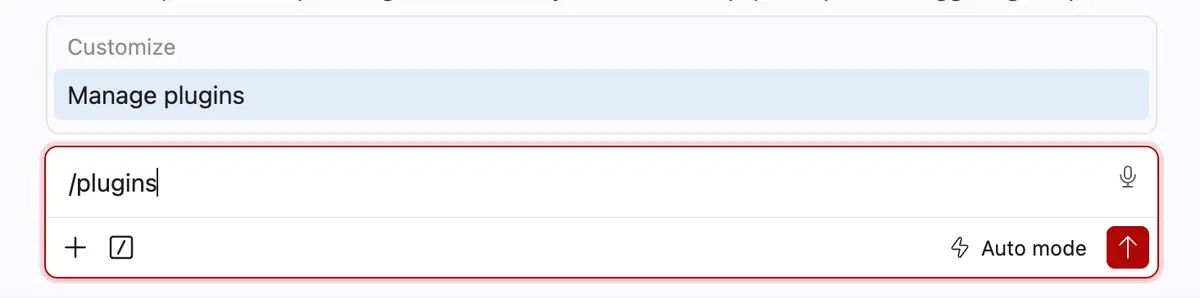
Install the official setup plugin. Add Claude Code's official marketplace, then install the setup plugin that holds the automation recommender.
Confirm it loaded. Once installed, you will see the skill load when you invoke it.

- Ask it in plain language. You do not need a special command. Any of these work:
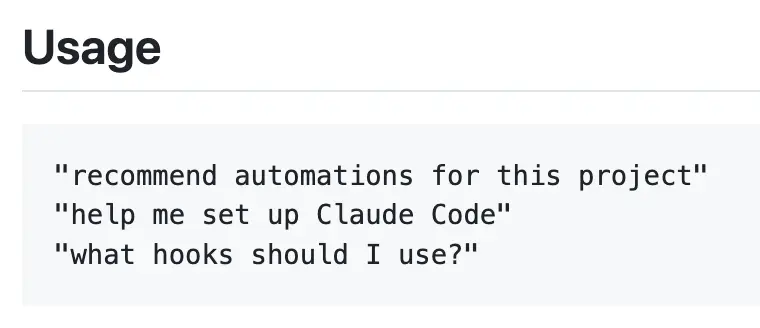
Say "recommend automations for this project," or "help me set up Claude Code," or "what hooks should I use?" and it does the rest. It reads your codebase and hands back the shortlist with the reason for each pick.
If you ever want to see what is installed on disk, the plugins live in your local Claude directory.

Frequently Asked Questions
Which Claude Code plugins do I actually need?
You need the few that match your stack, not all 200. The automation recommender answers this for your specific project: it reads your codebase and names the one or two plugins per category worth adding, so you install what helps instead of guessing. If you would rather start from a short list, these 5 plugins cover current docs, issues, planning, design and the browser.
What is the Claude automation recommender?
The Claude automation recommender is a skill inside Claude Code's official setup plugin that reads your project and recommends automations across all five extension types: MCP servers, skills, hooks, subagents, and plugins. You ask it in plain language, and it returns a short list picked for your stack.
Is the automation recommender free?
Yes. The automation recommender is part of Claude Code's official setup plugin, which you install from the official marketplace. There is no separate cost to run it beyond your normal Claude Code usage.
Does it install the plugins for me?
No. The recommender is read only, so it never changes a file or installs anything on its own. It tells you what to add and why, and you decide what to act on. You do the install yourself, or ask Claude to.
Do I need to be a developer to use it?
No. You install it once, then ask it a plain question like "help me set up Claude Code." It reads your project and explains its picks in normal language, so you can follow the recommendations without writing any code.
Getting the Right Claude Code Setup
You do not need every plugin you can find. You need the few that fit what you are building, and the automation recommender is the fastest way to find them. It reads your project, checks all five automation types, and hands you a short list with a reason for each pick. You can read the recommender's source to see exactly how it defines its recommendations.
If you are early enough with Claude Code that the terminal still interrupts you constantly, the three settings I change on every fresh setup are worth doing before you add anything at all. Beyond the plugins the recommender picks, one setup is worth building on purpose. The improvement skill turns Claude into a coach that fixes the process behind a bug so the same problem stops costing you time. If you want to build systems like these from scratch, my AI workshop walks through the setup I run in Claude Code every day.