
Best MCP Servers in 2026: What Actually Earns a Slot
The best MCP servers are the ones that do something your command line cannot, or cannot do without a detour. An MCP server is a small program that hands an AI agent a set of tools, so Claude Code can reach a service like Google Drive or a browser directly instead of you copying things back and forth. Most of the servers on a typical list fail that test, because the thing they connect to already ships a command line tool, a CLI, that the agent knows how to use.
That test used to have a second half about cost, and this is the part that has changed. Tool definitions used to load into the context window before any work started, and Anthropic's own documentation puts a five server setup, GitHub with Slack, Sentry, Grafana and Splunk, at around 55,000 tokens of definitions before a single question is asked. On a fixed plan that is not a bill, it is context you no longer have. That is no longer how Claude Code behaves. Its own docs say tool search is enabled by default, that MCP tools are held back until the agent reaches for them rather than loaded upfront, and that only tool names and server instructions load at the start of a session. It matches what I see in my own sessions: the names arrive, the descriptions do not.
So the old reason to keep the list short is mostly gone, and what survived it is not what people argue about. Below is what I run, what I cut, and the five minute audit that tells you which of yours is doing real work.
Key takeaways
- An MCP server earns its place when it reaches something your command line cannot, or would need re authorizing to match: access you already granted, a browser, or a tool with no command line at all.
- The token cost of connecting one has dropped. Claude Code holds most of the detail back until it is needed.
- What survived is the skills. Every skill you have installed still lists itself each session, used or not, inside a budget that trims the ones you never touch.
- Anthropic has floated an alternative to dropping MCP: have the agent write code that calls those tools, so only the answer comes back.
- Servers pile up once the token cost stops enforcing a limit for you, and the plugins you no longer use cost more than the servers do.
In a hurry? Jump to the five minute audit and run it on your own setup.
What actually loads at the start of a session
A tool schema is the full instruction sheet for one tool: what it is called, what it does, and every argument it takes. That sheet is the expensive part, and where it loads is the whole question.
| What it is | When it loads |
|---|---|
| MCP tool schemas | On demand, when Claude searches and finds the tool |
| MCP tool names, plus each server's instructions | Every session, with the instructions capped at 2KB per server |
| Skill names, plus descriptions up to a budget | Every session, used or not |
| Your instruction files | Every session |
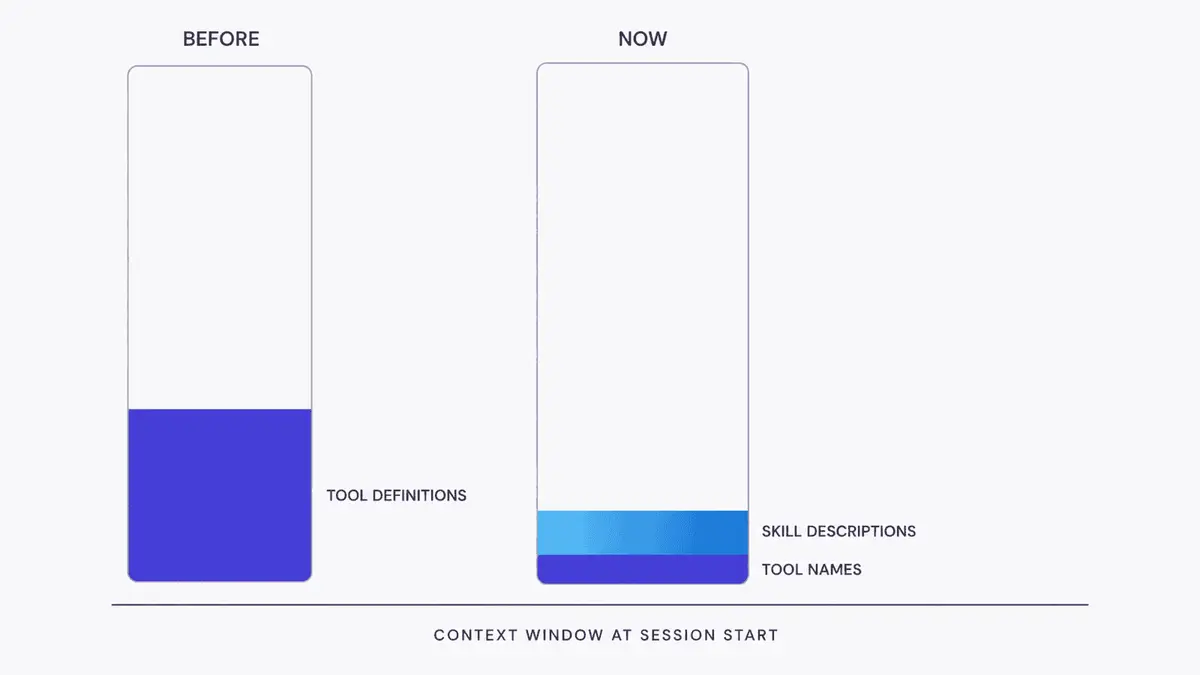
The middle two rows are where the surprise sits. Anthropic's answer to the tool definition problem is a mechanism called the tool search tool, which marks tools as deferred so only the few needed in a given turn get loaded. The same documentation reports this typically cutting that baseline by more than 85 percent, loading the three to five tools needed for a request instead of the whole catalogue. In Claude Code this is on by default and you do not have to do anything. Two exceptions are worth knowing: if your Claude Code runs through an employer's own gateway rather than connecting to Anthropic directly, or you are on a model older than the 4.5 generation, tools still load upfront the old way. If someone else set Claude Code up for you, ask them; on a normal direct setup with a current model, neither applies.
That page names a second cost, and it is worth reading in full rather than in half. A model's ability to pick the right tool does degrade once it has more than thirty to fifty available. Anthropic's point is that tool search is the fix for that, not a casualty of it: because only a focused set loads on demand, accuracy holds up across thousands of tools. So my seventy odd are not the problem the raw number makes them sound. What is left is narrower, and it is worth saying plainly. A search can surface the wrong five. A server you stopped using stays authenticated and connected. Neither costs much context now, and neither cleans itself up.
Skills work the other way around. Every skill you have installed puts its name in context at the start of every session, and its description with it, up to a budget of about one percent of the context window. Past that, Claude Code starts dropping descriptions, least used first, so the skills you never touch are the ones that lose their text. Only the full body waits until the skill is invoked. The cost is bounded, then, but you pay it every session, and a plugin that ships twenty skills is twenty more entries in that listing.
Here is my own setup as of today. I run seven MCP servers across Claude Code: Google Drive, Gmail, Canva, Clay, Context7, Excalidraw and Resend. Between them they expose about 73 tools. One of those servers, Canva, accounts for 33 of the 73 on its own, and I use maybe two of them. On the old model that server alone would have been a real tax. Today it costs me a list of names and one short block of instructions.
Three of those seven pass my own test. The other four are there because I connected them once, and they are on my own list to cut, which is the useful thing to notice: deferred loading took away the pressure that used to keep the list honest. Of the four plugin bundles I have installed, the ones I no longer use are the line item to look at first.
The test: does it do something the command line cannot
A CLI, short for command line interface, is a program you run by typing its name rather than by clicking around a website. Most services you would want to connect already ship one, and if a service has a good CLI, the agent can just use it.
GitHub is the example to hold onto. It ships one, called gh, and Claude Code can use it to do the things you would otherwise do on the GitHub website, with no server sitting in between. That one pattern covers a surprising amount of what the popular lists recommend.
What a CLI cannot easily do falls into three buckets, and those three buckets are where the servers worth keeping live.
Access that is already granted. I have the Google Workspace CLI installed and authenticated, and it looked like the obvious replacement for a Drive connection. The permission it holds only covers files it created itself, so the moment I pointed it at a document I had uploaded in the browser, it returned a not found error. The file was right there. The tool simply could not see it. The Drive connection reads the same file without complaint, because the permission it asked for when I connected it was wider.
Worth being precise about what that proves. It is a scope I chose, and I could re authorize the CLI with broader permissions tomorrow. What the server saved me was the trip, and that is a smaller claim than "a CLI cannot reach your files."
Driving a browser. An agent that opens a browser, clicks through a page and reads back what happened, one step at a time, is working differently from one that writes an entire script and runs it blind. Both are possible from a command line. The server is what makes it interactive, which matters when you do not know what the page will do next.
Services with no CLI at all. Some things only exist as a hosted product, with nothing to install and nothing to pipe. Your own internal systems usually qualify, since nobody has published a tool for them.
Everything else is a judgment call, and it usually goes to the command line: no server to start, one sign in you already did once, and the agent can see exactly what it ran.